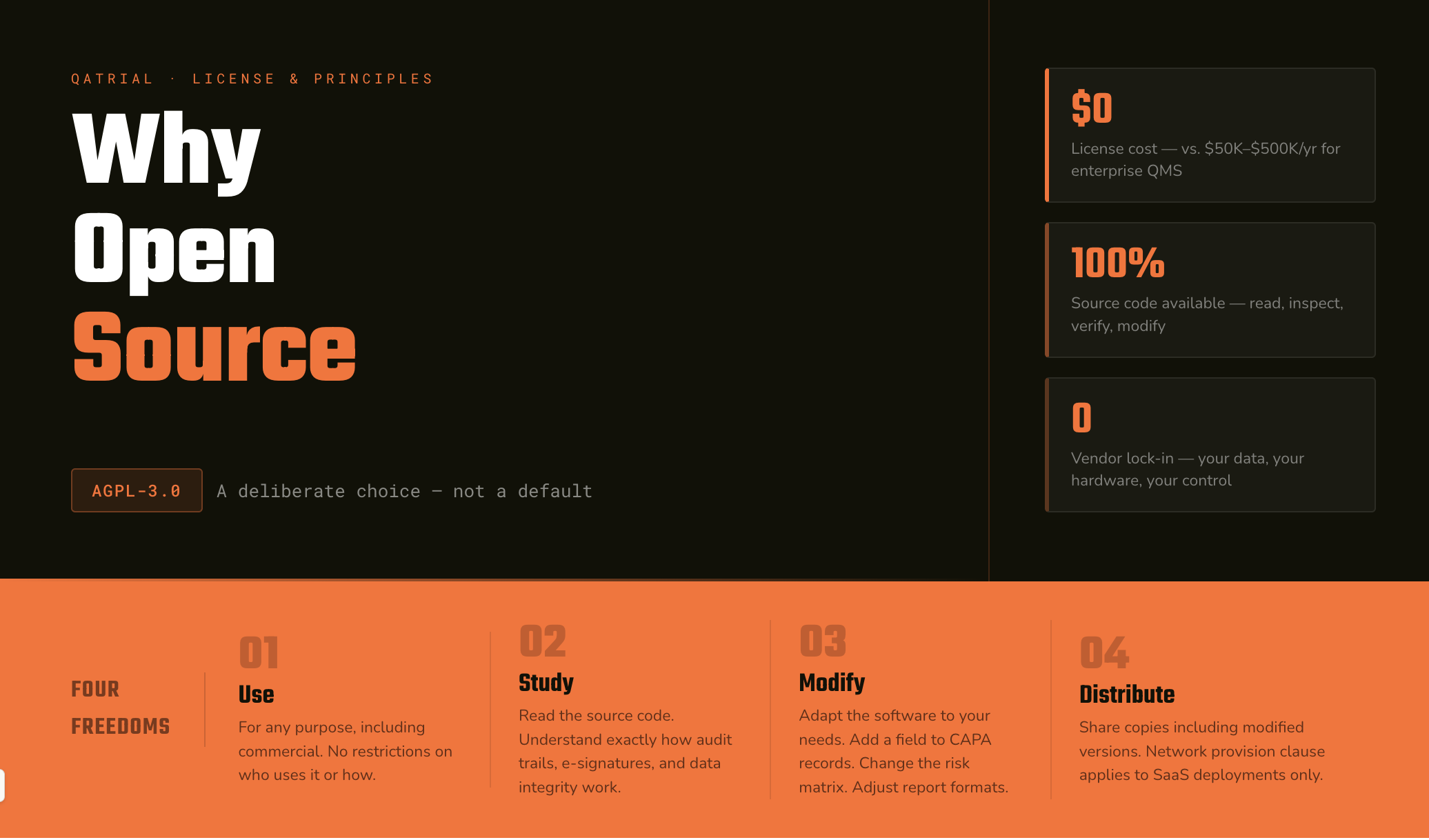

QAtrial is a regulated quality workspace for quality management. In an industry where quality management software typically costs $50,000 to $500,000 per year and runs on vendor-controlled infrastructure, QAtrial takes a different approach, running locally with the user’s data staying on their own machine.

Get monitors, keyboards and dev gear delivered free — and shop member deals
- Fast, free delivery on millions of items
- Access to Prime Big Deal Days deals on October 6–7
- Prime Video, Amazon Music and more included
This article covers QAtrial’s capabilities, why it is particularly relevant for regulated industries, how to address the validation question, and what the practical implications are for organizations considering QAtrial.
&
Principles
Freedoms
| Factor | Proprietary QMS (MasterControl, Veeva, etc.) | QAtrial v3.0 |
|---|---|---|
| Data Location | Vendor cloud (AWS / Azure) | Your machine / your network |
| Customization | Vendor professional services — $200–400/hr, months to deliver | Documented customization — React/TypeScript |
| Vendor Lock-In | High — 12–24 months to migrate | Low — data stored locally, no forced migration |
| Audit Transparency | Vendor documentation only | Documented system behavior — transparent to auditors |
| Implementation Time | 3–18 months | Hours to days — runs directly in the browser |
| Validation Approach | Vendor-supplied evidence (IQ/OQ/PQ documentation) | Your own verification against documented behavior |
| AI Data Privacy | Vendor-dependent — review each AI integration | Local models (Ollama / LM Studio) — zero data egress |
| Community Templates | None — per-customer, or sold as consulting | Built-in templates — shared regulatory knowledge |
Why QAtrial Fits Regulated Industries
Regulated industries have specific concerns that QAtrial addresses more naturally than proprietary software.
Transparent System Behavior
When a regulatory auditor reviews your quality management system, they may want to understand how the system works. With proprietary software, you provide the vendor’s validation documentation and hope it satisfies the auditor’s questions.
With QAtrial, system behavior is documented in detail. If an auditor asks “how does the audit trail work?”, you can explain how every event is recorded, which event types are captured, and how the trail is displayed. If they ask “how are electronic signatures verified?”, you can describe the re-authentication logic and the 15-minute window implementation.
This transparency builds trust. The auditor does not have to take the vendor’s word for it.
No Vendor Lock-In
Vendor lock-in in quality management software is a serious operational risk. If your QMS vendor raises prices by 40%, you have two options: pay or migrate. Migration from one QMS to another typically takes 12-24 months and costs hundreds of thousands of dollars. Vendors know this, and pricing reflects it.
With QAtrial, your quality data is stored in localStorage or whatever persistence layer you choose, not in a vendor’s cloud. The software runs on your own terms, and your data remains under your control.
Data Sovereignty
Pharmaceutical companies, defense contractors, and healthcare organizations frequently have strict requirements about where data resides and who can access it. Cloud-hosted QMS platforms store your data on the vendor’s infrastructure, typically in AWS or Azure data centers. Even with contractual guarantees, some organizations cannot accept this.
QAtrial runs entirely in the browser. Data stays in localStorage on the user’s machine. There is no cloud service, no telemetry, no data leaving your network. For AI features, you can use local models (Ollama, LM Studio) to keep even AI processing on-premise. This level of data control is difficult to achieve with proprietary SaaS products.
Community Templates and Knowledge
Regulated industries share common quality requirements. ISO 13485 clause 4.2.4 (Control of Documents) means the same thing whether you make surgical instruments or infusion pumps. The requirements to address it are similar across organizations.
QAtrial supports reusable templates, regulatory mappings, and compliance knowledge. When one organization creates a comprehensive set of requirements for ISO 13485 compliance, that work can benefit every medical device company using QAtrial. In proprietary systems, this knowledge is locked in each customer’s instance or sold as consulting services.
Customizability
Every regulated organization has specific quality requirements that do not fit neatly into a vendor’s template. Maybe your deviation management process has six stages instead of four. Maybe your risk taxonomy uses a 4×4 matrix instead of 5×5. Maybe your regulatory authority requires a specific report format.
With proprietary software, customization means vendor professional services at $200-400 per hour, with timelines measured in months. With QAtrial, customization is a development task. The Developer Guide documents how to add countries, verticals, modules, languages, and AI prompts. A developer familiar with React and TypeScript can make these changes.
As an affiliate, we earn on qualifying purchases.
Addressing the Validation Question
The most common question about QAtrial in regulated industries is: “Can we validate this software?”
The short answer is yes. Regulatory frameworks focus on whether the software is fit for its intended use and whether you can demonstrate that through documented evidence.
GAMP 5 Second Edition Perspective
GAMP 5 Second Edition (published by ISPE) provides a risk-based framework for computer system validation. It categorizes software by complexity and configurability, not by license type. QAtrial would be categorized based on its functionality and how it is configured, just as any commercial tool would be.
GAMP 5 recognizes that modern software development practices (version control, automated testing, code review) provide inherent quality assurance. Tools with documented development processes and automated test suites may provide more validation evidence than proprietary tools that offer only a vendor’s assertion of quality.
What Validation Looks Like
Validating QAtrial for your intended use follows the same process as validating any quality tool:
- Intended Use Statement: Document what you are using QAtrial for (e.g., “requirements management and test tracking for medical device quality management”)
- Risk Assessment: Assess the risk associated with the software in your context (impact of failure, criticality of data)
- Requirements Specification: Define what the software must do (functional requirements, data integrity requirements, access control requirements)
- Verification Testing: Execute tests that verify the software meets your requirements
- Documentation: Document the validation activities, results, and conclusions
QAtrial’s documented behavior helps with validation. You can confirm that the audit trail implementation meets 21 CFR Part 11 requirements against the documented implementation, not by relying on a vendor’s claim.
Ongoing Validation Considerations
QAtrial publishes releases with changelogs. When you upgrade, your validation must account for the changes. This is identical to upgrading proprietary software, with the changes clearly documented.
For maximum control, pin your installation to a specific version and only upgrade after assessing the impact of changes.
regulated industry compliance software
As an affiliate, we earn on qualifying purchases.
As an affiliate, we earn on qualifying purchases.
The Local Deployment Advantage
Running QAtrial locally is not just about data sovereignty. It has practical implications for regulated organizations:
Air-gapped environments: Some facilities (defense, certain pharmaceutical manufacturing) operate in air-gapped networks. QAtrial runs without any network connection, entirely offline. Try that with a SaaS QMS.
Performance predictability: Your quality system does not depend on someone else’s infrastructure. There are no cloud outages affecting your ability to access quality records during an FDA inspection.
Configuration control: You control every aspect of the deployment. No vendor pushing updates that change behavior mid-validation cycle.
Cost predictability: There are no per-seat subscription fees that grow with headcount. Your costs are the time to deploy, validate, and maintain it. These costs are predictable and within your control.
data integrity audit trail software
As an affiliate, we earn on qualifying purchases.
As an affiliate, we earn on qualifying purchases.
Comparison with Proprietary Tools
| Factor | Proprietary QMS | QAtrial |
|---|---|---|
| Data location | Vendor cloud | Your machine/network |
| Customization | Vendor professional services | Documented customization options |
| Vendor lock-in | High | None |
| Audit transparency | Vendor documentation only | Documented system behavior |
| Implementation time | 3-18 months | Hours to days |
| Validation approach | Vendor-supplied evidence | Your own verification with documented evidence |
| AI data privacy | Vendor-dependent | Local models available |
| Community templates | No | Built-in templates |
customizable quality management system
As an affiliate, we earn on qualifying purchases.
As an affiliate, we earn on qualifying purchases.
Current Limitations
Being honest about limitations:
Support: There is no traditional vendor support line. If you encounter a bug, resolving it depends on internal expertise or an available support arrangement. Organizations that need guaranteed response times need internal expertise to support the tool.
Liability: There is no vendor warranty. If the audit trail has a bug that causes a compliance issue, the liability is yours, not a vendor’s. With proprietary software, the vendor’s contract may (or may not) provide some liability protection.
Perception: Some regulatory bodies and auditors are more familiar with validated commercial tools. Using QAtrial may require additional explanation during audits. The regulatory frameworks support it, but individual auditors may have questions.
Enterprise features: QAtrial v3.0 is a powerful quality workspace, but it does not yet have features like real-time multi-user collaboration, a REST API, or webhook integrations that large enterprise deployments require. These are on the roadmap (v3.1 and beyond) but not available today.
The Principle
The principle behind QAtrial is straightforward: in an industry where trust and transparency are foundational values, the tools that manage quality records should themselves be transparent and trustworthy.
You should not have to trust a vendor’s marketing material about how their audit trail works. You should not have to negotiate with a vendor to add a field to your CAPA records — with QAtrial’s documented customization options, a developer can add it. You should not have to hope that your vendor’s cloud infrastructure meets your data sovereignty requirements — QAtrial keeps your data on your own machine.
QAtrial is built for regulated quality management because it emphasizes exactly the kind of transparency and control that this work demands.
Fall Picks
fall essentials
As an affiliate, we earn on qualifying purchases.