For most programmers, I’d start with the Keychron V5 Max: its 96% layout keeps a number pad while saving desk space, and its wireless options suit flexible setups. The Keychron V6 is a strong wired alternative for people who want full-size keys and QMK/VIA customization, while the Keychron K3 is a more compact, low-profile pick for a lighter typing feel. The main tradeoffs are layout versus desk space, wired simplicity versus wireless flexibility, and customization versus a ready-to-use design. Switch feel and noise also matter if you type for long stretches or share a room. Read on for how all 15 keyboards compare and which one fits your coding setup.

Get business pricing on monitors, keyboards and dev gear
- Business-only prices and quantity discounts
- Tax-exempt purchasing
- Multiple users, one account, clear invoices
Key Takeaways
- The Keychron V5 Max stands out as the most balanced programming layout: its 96% format keeps the number pad without taking up the width of a traditional full-size board.
- The V6 favors customization over compactness: QMK/VIA support and hot-swappable switches make it a better wired choice for people who expect to tune their setup.
- Wireless options vary in purpose: the AULA F99 emphasizes tri-mode connectivity, while the ProtoArc K310 Pro and Logitech MX Mechanical focus on wireless convenience with different layout and typing priorities.
- Compact boards require workflow compromises: the K3 and F75 Pro save space, but programmers who rely on a number pad or dedicated navigation keys may prefer the K4, V5 Max, or V6.
- Not every keyboard here is equally programmable: QMK/VIA models offer more room for remapping and macros than boards chosen mainly for straightforward typing or gaming-oriented features.
| Logitech G413 SE Full-Size Mechanical Gaming Keyboard |  | Best for a Durable Full-Size Wired Setup | Layout: Full-size QWERTY, 108 keys | Switch type: Tactile mechanical | Connectivity: Wired USB 2.0 | VIEW LATEST PRICE | See Our Full Breakdown |
| AULA F99 Tri-Mode Wireless Mechanical Keyboard | 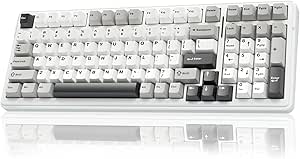 | Best for Multi-Device Wireless Work | Layout: 96% compact, 99 keys | Connectivity: Bluetooth 5.0, 2.4 GHz wireless, USB-C | Device connections: Up to 5 | VIEW LATEST PRICE | See Our Full Breakdown |
| ProtoArc K310 Pro Full-Size Backlit Wireless Mechanical Keyboard |  | Best for Quiet, Multi-Device Full-Size Typing | Layout: Full-size QWERTY, 108 keys | Switch type: Linear red | Connectivity: Bluetooth and 2.4 GHz USB receiver | VIEW LATEST PRICE | See Our Full Breakdown |
| Redragon K668 108-Key Hot-Swap Wired RGB Gaming Keyboard |  | Best Value for Switch and Shortcut Customization | Layout: QWERTY, 108 keys | Switches: Linear red | Hot-swappable: Yes; supports 3-pin and 5-pin switches | VIEW LATEST PRICE | See Our Full Breakdown |
| AULA F75 Pro 75% Wireless Mechanical Keyboard |  | Best Compact Wireless Pick | Layout: 75%, QWERTZ, 81 keys | Connectivity: Bluetooth 5.0, 2.4 GHz wireless, USB-C | Switches: Linear LEOBOG Reaper; hot-swappable 3-pin or 5-pin | VIEW LATEST PRICE | See Our Full Breakdown |
| Keychron K3 Version 2 QMK 75% Wireless Low-Profile Mechanical Keyboard |  | Best Compact Low-Profile Pick | Layout: 75% QWERTY, 84 keys | Switches: Brown tactile | Connectivity: Bluetooth 5.1 for up to 3 devices; USB-C wired | VIEW LATEST PRICE | See Our Full Breakdown |
| Keychron K8 Tenkeyless Wireless Mechanical Keyboard with Brown Switches |  | Best Tenkeyless Wireless Pick | Layout: Tenkeyless, 87 keys | Switches: Tactile brown | Connectivity: Bluetooth 5.1 and USB-C wired | VIEW LATEST PRICE | See Our Full Breakdown |
| Keychron Q5 Pro 96% Wireless Mechanical Keyboard, Purple |  | Best Customizable Premium Pick | Layout: 96% QWERTY, 101 keys | Switches: Tactile Keychron K Pro Brown | Connectivity: Bluetooth 5.1 and USB-C | VIEW LATEST PRICE | See Our Full Breakdown |
| Logitech MX Mechanical Wireless Illuminated Keyboard, Clicky |  | Best Full-Size Clicky Pick | Layout: Full-size QWERTY, 104 keys | Switches: Low-profile clicky mechanical | Connectivity: Bluetooth Low Energy, Logi Bolt receiver, USB-C charging | VIEW LATEST PRICE | See Our Full Breakdown |
| Keychron K4 Version 2 96% Wireless Mechanical Keyboard with Brown Switches and White Backlight |  | Best Value Number-Pad Layout | Layout: 96% QWERTY, 100 keys | Switches: Tactile Keychron Apex Brown | Connectivity: Bluetooth 5.1 and USB-C wired | VIEW LATEST PRICE | See Our Full Breakdown |
| Keychron V5 Max 96% Wireless Mechanical Keyboard with Number Pad |  | Best Overall for Flexible Programming Setups | Layout: 96% QWERTY | Keys: 97 | Connectivity: 2.4 GHz, Bluetooth 5.1, USB-C | VIEW LATEST PRICE | See Our Full Breakdown |
| RK Royal Kludge S98 Wireless Mechanical Keyboard with Smart Display and Knob |  | Best for On-Keyboard Controls | Layout and keys: QWERTY, 98 keys | Connectivity: Bluetooth 5.0, 2.4 GHz, USB-C | Switches: Linear RK switches | VIEW LATEST PRICE | See Our Full Breakdown |
| Keychron V6 Full-Size Wired Mechanical Keyboard with QMK/VIA and Hot-Swappable Red Switches |  | Best for Programmable Full-Size Layouts | Layout and keys: Full-size QWERTY, 108 keys | Connectivity: Wired USB-C | Switches: Linear Keychron K Pro Red | VIEW LATEST PRICE | See Our Full Breakdown |
| Keychron C2 Full-Size Wired Mechanical Keyboard with Brown Switches |  | Best Straightforward Tactile Full-Size Pick | Layout and keys: Full-size QWERTY, 104 keys | Switches: Tactile Keychron Brown | Connectivity: Wired USB-C | VIEW LATEST PRICE | See Our Full Breakdown |
| Redragon K671 Wired Mechanical Gaming Keyboard with Hot-Swappable Red Switches |  | Best Budget-Minded Hot-Swap Starter | Layout and keys: QWERTY, 104 keys | Connectivity: Wired | Switches: Linear red | VIEW LATEST PRICE | See Our Full Breakdown |
| mechanical keyboards for programmer | Connectivity | Switches | Backlighting | Layout |
|---|---|---|---|---|
| Logitech G413 SE Full-Size Mec | Wired USB 2.0 | — | Single-color white LED | Full-size QWERTY, 108 keys |
| AULA F99 Tri-Mode Wireless Mec | Bluetooth 5.0, 2.4 GHz wireless, USB-C | Pre-lubed linear, hot-swappable 3-pin or 5-pin | RGB, 16 lighting effects | 96% compact, 99 keys |
| ProtoArc K310 Pro Full-Size Ba | Bluetooth and 2.4 GHz USB receiver | — | Single color, 10 effects | Full-size QWERTY, 108 keys |
| Redragon K668 108-Key Hot-Swap | Wired USB-C | Linear red | RGB with up to 19 preset modes | QWERTY, 108 keys |
| AULA F75 Pro 75% Wireless Mech | Bluetooth 5.0, 2.4 GHz wireless, USB-C | Linear LEOBOG Reaper; hot-swappable 3-pin or 5-pin | RGB, 16 preset effects | 75%, QWERTZ, 81 keys |
| Keychron K3 Version 2 QMK 75% | Bluetooth 5.1 for up to 3 devices; USB-C wired | Brown tactile | White LED | 75% QWERTY, 84 keys |
| Keychron K8 Tenkeyless Wireles | Bluetooth 5.1 and USB-C wired | Tactile brown | Single-color white | Tenkeyless, 87 keys |
| Keychron Q5 Pro 96% Wireless M | Bluetooth 5.1 and USB-C | Tactile Keychron K Pro Brown | RGB; keycaps are not shine-through | 96% QWERTY, 101 keys |
| Logitech MX Mechanical Wireles | Bluetooth Low Energy, Logi Bolt receiver, USB-C charging | Low-profile clicky mechanical | Smart illumination with automatic adjustment | Full-size QWERTY, 104 keys |
| Keychron K4 Version 2 96% Wire | Bluetooth 5.1 and USB-C wired | Tactile Keychron Apex Brown | White LED, static or flashing modes | 96% QWERTY, 100 keys |
| Keychron V5 Max 96% Wireless M | 2.4 GHz, Bluetooth 5.1, USB-C | Gateron Jupiter Red linear | — | 96% QWERTY |
| RK Royal Kludge S98 Wireless M | Bluetooth 5.0, 2.4 GHz, USB-C | Linear RK switches | — | — |
| Keychron V6 Full-Size Wired Me | Wired USB-C | Linear Keychron K Pro Red | — | — |
| Keychron C2 Full-Size Wired Me | Wired USB-C | Tactile Keychron Brown | None | — |
| Redragon K671 Wired Mechanical | Wired | Linear red | 11 modes; color cannot be changed | — |
More Details on Our Top Picks
Logitech G413 SE Full-Size Mechanical Gaming Keyboard
The G413 SE is a straightforward choice for programmers who want a full-size layout, tactile feedback, and a sturdy wired desk setup. Its PBT keycaps are better suited to sustained daily typing than more wear-prone keycap materials, while the aluminum-magnesium top case gives it a solid feel without adding wireless features to manage. Compared with the ProtoArc K310 Pro, it gives up multi-device wireless convenience and quieter linear switches, but offers tactile switches and a simpler connection that needs no battery charging. The tradeoff is a limited feature set: white-only lighting, six-key rollover, and no switch customization. I’d choose it over the more mod-friendly Redragon K668 when durable materials and a no-fuss full-size board matter more than hot-swapping or programmable shortcuts.
Pros:- PBT keycaps are suited to frequent typing and resist heat and wear.
- Tactile switches provide a noticeable keystroke response while coding.
- Aluminum-magnesium alloy top case adds a sturdy feel.
- Dedicated function-key media controls and anti-ghosting support everyday use.
Cons:- Wired USB connection limits desk flexibility and multi-device use.
- Single-color white lighting offers less customization than the Redragon K668.
- Six-key rollover is less capable than full N-key rollover.
Best for: Programmers who want a durable, tactile full-size keyboard for a fixed desk and do not need wireless connectivity or switch customization.
Not ideal for: People who regularly switch between computers, want quiet linear switches, or need extensive per-key customization.
- Layout:Full-size QWERTY, 108 keys
- Switch type:Tactile mechanical
- Connectivity:Wired USB 2.0
- Keycaps:PBT
- Backlighting:Single-color white LED
- Key rollover:6-key rollover anti-ghosting
- Top case:Aluminum-magnesium alloy
- Compatibility:Windows and macOS
Our verdict“Choose the G413 SE for a durable, tactile full-size keyboard at a fixed workstation, but pick a wireless or hot-swappable model if flexibility matters more.”
AULA F99 Tri-Mode Wireless Mechanical Keyboard
The AULA F99 suits programmers who move between a work computer, personal laptop, and other devices but still want a number pad. Its three connection modes and support for up to five paired devices make it more adaptable than the wired Redragon K668, while the 96% layout keeps arrow keys and number-entry capability in a compact footprint. Linear switches, hot-swap support, programmable keys, and five layers of sound-dampening material give it room to fit a quieter, more personalized workspace. The main drawback is that the supplied layout is described as AZERTY, which may frustrate buyers who expect a different key arrangement. Its Windows compatibility is also narrower than the ProtoArc K310 Pro, and water repellent does not mean waterproof. I’d pick it for wireless flexibility, not for a plug-and-play universal layout.
Pros:- Bluetooth, 2.4 GHz, and USB-C connectivity support flexible desk setups.
- Can pair with up to five devices.
- 96% layout retains arrow keys and a number area while saving space.
- Hot-swappable linear switches and sound-dampening construction allow customization and a more restrained typing sound.
Cons:- AZERTY layout may not suit programmers who use QWERTY or another arrangement.
- Listed operating-system compatibility is limited to Windows.
- Water-repellent construction is not described as fully waterproof.
Best for: Programmers who alternate among several devices, need a number pad, and are comfortable with the keyboard’s AZERTY layout and Windows compatibility.
Not ideal for: Buyers who require QWERTY or broad operating-system compatibility, or who need a board with a stated waterproof rating.
- Layout:96% compact, 99 keys
- Connectivity:Bluetooth 5.0, 2.4 GHz wireless, USB-C
- Device connections:Up to 5
- Switches:Pre-lubed linear, hot-swappable 3-pin or 5-pin
- Keycaps:Double-shot PBT
- Backlighting:RGB, 16 lighting effects
- Battery:Rechargeable 8000 mAh
- Compatibility:Windows; compatible devices include PC, laptop, console, smartphone, and tablet
Our verdict“Pick the F99 if you want a compact number-pad layout and multi-device wireless convenience, provided its AZERTY layout works for you.”
ProtoArc K310 Pro Full-Size Backlit Wireless Mechanical Keyboard
For programmers who want a number pad without a permanently tethered desk, the K310 Pro combines a full-size layout with Bluetooth and a 2.4 GHz receiver. Its linear red switches are described as quiet, making this a more office-conscious pick than the tactile Logitech G413 SE. It can connect to three devices and works across Windows, macOS, Android, iOS, and iPadOS, giving it broader stated compatibility than the Windows-only AULA F99. The aluminum top case and USB-C charging add practical touches, while macro customization offers some workflow control. The tradeoff is that macros require the 2.4 GHz connection, and its single-color backlighting is less flexible than the RGB on the Redragon K668. Choose it for quiet, multi-device productivity rather than extensive lighting or switch customization.
Pros:- Quiet linear red switches are suited to shared workspaces.
- Connects to up to three devices through Bluetooth or a 2.4 GHz receiver.
- Full-size 108-key layout keeps the number pad available.
- Aluminum top case, USB-C charging, and macro customization support daily productivity.
Cons:- Macro customization requires a 2.4 GHz USB connection.
- Single-color backlighting is less customizable than the RGB Redragon K668.
- Switches are not listed as hot-swappable.
Best for: Programmers who want quiet linear switches, a full-size layout, and the ability to alternate among computers or mobile devices.
Not ideal for: Buyers who want RGB lighting, hot-swappable switches, or macro setup that works over Bluetooth.
- Layout:Full-size QWERTY, 108 keys
- Switch type:Linear red
- Connectivity:Bluetooth and 2.4 GHz USB receiver
- Multi-device support:Up to 3 devices
- Backlighting:Single color, 10 effects
- Top case:Aluminum
- Power:USB-C rechargeable battery
- Compatibility:Windows, macOS, Android, iOS, and iPadOS
Our verdict“Choose the K310 Pro for quiet full-size typing across multiple devices, but skip it if RGB effects or wireless macro configuration are priorities.”
Redragon K668 108-Key Hot-Swap Wired RGB Gaming Keyboard
The K668 is a practical pick for programmers who want to customize their keyboard without giving up a full-size layout. Its hot-swappable linear switches accept 3-pin and 5-pin options, so you can change the typing feel without soldering; the Redragon K671 in this roundup also offers hot-swappable red switches, but the K668 adds four dedicated shortcut keys and two keycap sets. Those shortcuts can put common actions such as mute or screen lock within easy reach, while software supports custom macros and lighting. The cost of that flexibility is a wired-only connection, unlike the multi-device AULA F99 or ProtoArc K310 Pro. Its RGB modes are extensive, but the supplied data gives no protection level for the listed water resistance. I’d choose this for a stationary PC setup that benefits from hardware shortcuts and future switch changes.
Pros:- Hot-swap sockets support 3-pin and 5-pin switches without soldering.
- Four dedicated shortcut keys can be customized for frequent actions.
- Software supports custom shortcuts, macros, and lighting.
- Includes two keycap sets and adjustable feet.
Cons:- Wired USB-C connectivity limits desk flexibility and multi-device use.
- Water resistance is listed without a stated protection level.
- Compatibility is specified for PC and laptop, with no broader operating-system detail.
Best for: Programmers at a fixed PC workstation who want to experiment with switches and assign common actions to dedicated keys.
Not ideal for: People who need wireless device switching, broad stated operating-system compatibility, or a clearly specified water-protection rating.
- Layout:QWERTY, 108 keys
- Switches:Linear red
- Hot-swappable:Yes; supports 3-pin and 5-pin switches
- Connectivity:Wired USB-C
- Backlighting:RGB with up to 19 preset modes
- Shortcut keys:4 dedicated keys
- Included keycaps:2 sets
- Compatibility:PC and laptop
Our verdict“Choose the K668 for a wired full-size workspace where switch swapping and dedicated shortcuts matter more than wireless convenience.”
AULA F75 Pro 75% Wireless Mechanical Keyboard
The F75 Pro is the most space-conscious choice here for programmers who want arrow keys and function-row access but can work without a number pad. Its 75% layout leaves more room for mouse movement than the full-size Logitech G413 SE or the 96% AULA F99, while keeping a multifunction knob and programmable keys for quick adjustments. Bluetooth, 2.4 GHz, and USB-C let it move among different setups, and hot-swap support makes its linear switches easier to tailor than the non-hot-swappable ProtoArc K310 Pro. The main layout caveat is QWERTZ, which may put punctuation and symbols in unfamiliar positions for QWERTY users. Its 4000 mAh battery is smaller than the F99’s 8000 mAh capacity, and water repellent is not a waterproof rating. This is a compact-workspace pick, not a number-entry board.
Pros:- Compact 75% layout retains arrow keys while freeing desk space.
- Bluetooth, 2.4 GHz, and USB-C support several connection setups.
- Hot-swappable switches allow customization without soldering.
- Multifunction knob, programmable keys, and RGB lighting add control options.
Cons:- QWERTZ layout may not suit programmers accustomed to QWERTY.
- No number pad, unlike the AULA F99 and full-size models.
- 4000 mAh battery capacity is smaller than the F99’s 8000 mAh battery.
- Water-repellent construction is not described as waterproof.
Best for: Programmers with limited desk space who want arrow keys, wireless device options, and switch customization but rarely use a number pad.
Not ideal for: QWERTY users who do not want to adapt to QWERTZ, frequent number-pad users, or buyers needing stated waterproof protection.
- Layout:75%, QWERTZ, 81 keys
- Connectivity:Bluetooth 5.0, 2.4 GHz wireless, USB-C
- Switches:Linear LEOBOG Reaper; hot-swappable 3-pin or 5-pin
- Battery:Rechargeable 4000 mAh
- Backlighting:RGB, 16 preset effects
- Keycaps:Side-printed PBT
- Device connections:Up to 5
- Water resistance:Water repellent
Our verdict“Pick the F75 Pro for a compact, customizable wireless coding setup if QWERTZ works for you and you can do without a number pad.”
Keychron K3 Version 2 QMK 75% Wireless Low-Profile Mechanical Keyboard
The K3 suits programmers who want dedicated arrow keys and a compact footprint without the height of a standard mechanical board. Its 84-key 75% layout keeps common navigation keys close, while low-profile brown switches provide tactile feedback in a slimmer package than the Keychron K8. QMK support adds room to remap keys around an editor or terminal workflow, and Bluetooth pairing with three devices makes switching between a work computer and another device straightforward. USB-C wired mode offers a direct alternative when wireless interference is a concern. The tradeoff is that the compact layout leaves out a number pad, and the board is not water resistant. Its white backlight is also less adjustable than the RGB lighting on the Q5 Pro.
Pros:- Compact 84-key layout retains dedicated arrow and navigation keys
- Low-profile build weighs 500 g and is suited to portable setups
- QMK customization supports programmer-specific key remapping
- Bluetooth connects up to three devices, with USB-C wired mode available
Cons:- No number pad, which can slow frequent spreadsheet or numeric work
- Bluetooth may be affected by signal interference
- Not water resistant
Best for: Programmers who travel, work at a shallow desk, or want arrow and navigation keys in a lighter, low-profile board.
Not ideal for: Developers who enter lots of numerical data, need a number pad, or want RGB lighting and a water-resistant keyboard.
- Layout:75% QWERTY, 84 keys
- Switches:Brown tactile
- Connectivity:Bluetooth 5.1 for up to 3 devices; USB-C wired
- Customization:QMK
- Backlighting:White LED
- Compatibility:macOS and Windows
- Dimensions:12.05 × 4.57 × 0.87 in
- Weight:500 g
Our verdict“Choose the K3 if a portable, low-profile programming keyboard matters more than a number pad or elaborate lighting.”
Keychron K8 Tenkeyless Wireless Mechanical Keyboard with Brown Switches
The K8 is a practical middle ground for programmers who want standard-height tactile keys but do not need a number pad. Its 87-key tenkeyless layout preserves the function row, arrows, and navigation cluster, giving it a more familiar desktop arrangement than the compact Keychron K3. It can pair with three devices over Bluetooth 5.1 or connect by USB-C, so it fits a mixed laptop-and-desktop setup. With the backlight off, its stated battery life reaches up to 200 hours, a useful match for long stretches away from a charger. The compromises are the missing number pad and 6-key rollover in wireless mode; wired mode supports NKRO. Compared with the Q5 Pro, it offers a simpler layout and fewer customization options.
Pros:- Tenkeyless layout keeps the function row, arrows, and navigation keys
- Bluetooth pairing supports up to three devices, with USB-C wired use
- Up to 200 hours of stated battery life with backlighting off
- Includes Mac and Windows keycaps
Cons:- No number pad for frequent numeric entry
- Wireless mode is limited to 6-key rollover rather than NKRO
- Not water resistant
Best for: Programmers who want a conventional function and navigation layout, tactile brown switches, and the option to work wirelessly across multiple computers.
Not ideal for: Developers who rely on a number pad, need wireless NKRO, or want hot-swappable switches and extensive QMK customization.
- Layout:Tenkeyless, 87 keys
- Switches:Tactile brown
- Connectivity:Bluetooth 5.1 and USB-C wired
- Bluetooth pairing:Up to 3 devices
- Backlighting:Single-color white
- Battery:4000 mAh; up to 200 hours with backlight off
- Key rollover:NKRO wired; 6KRO wireless
- Compatibility:macOS and Windows
Our verdict“Pick the K8 for a familiar, wireless tenkeyless layout; choose the Q5 Pro instead if customization and a number pad matter more.”
Keychron Q5 Pro 96% Wireless Mechanical Keyboard, Purple
For programmers who want to tailor their keyboard rather than stick with a fixed configuration, the Q5 Pro offers the most customization in this group. Its 96% layout with 101 keys keeps a number pad while using less space than a full-size board, and QMK remapping plus a programmable knob can put common commands or controls within easy reach. The hot-swappable switches make it easier to change the typing feel without replacing the keyboard, while its CNC aluminum body gives it a more substantial build than the plastic-framed K4. Bluetooth supports three devices, and USB-C is available for wired work. That flexibility comes with tradeoffs: the aluminum construction is less travel-friendly, wireless polling is lower than wired, and the PBT keycaps are not shine-through, limiting the usefulness of the RGB backlight in dim rooms.
Pros:- 96% layout retains a number pad while saving space over full-size boards
- QMK remapping and a programmable knob support tailored workflows
- Hot-swappable sockets accept compatible 3-pin and 5-pin MX-style switches
- CNC aluminum body and double-gasket design provide a substantial construction
Cons:- Wireless polling rate is 90 Hz, below the 1000 Hz wired rate
- PBT keycaps are not shine-through, so RGB does not illuminate the legends
- Aluminum construction is less convenient to carry than the K3 or K8
Best for: Programmers who want a sturdy 96% board with a number pad, QMK remapping, a programmable knob, and room to change switches.
Not ideal for: Frequent travelers, buyers seeking a light keyboard, or users who want backlit legends that shine through the keycaps.
- Layout:96% QWERTY, 101 keys
- Switches:Tactile Keychron K Pro Brown
- Connectivity:Bluetooth 5.1 and USB-C
- Customization:QMK remapping and programmable knob
- Hot-swappable:Yes; compatible with 3-pin and 5-pin MX-style switches
- Body and keycaps:CNC aluminum; double-shot PBT KSA profile
- Backlighting:RGB; keycaps are not shine-through
- Polling rate:1000 Hz wired; 90 Hz wireless
- Operating systems:Mac, Windows, and Linux
Our verdict“Choose the Q5 Pro if you want a customizable, number-pad-equipped workstation keyboard and can accept its weight and limited backlight-through-keycaps.”
Logitech MX Mechanical Wireless Illuminated Keyboard, Clicky
The MX Mechanical is the clearest fit here for programmers who want a full-size layout and an audible, clicky typing response. Its 104 keys include a number pad, unlike the tenkeyless Keychron K8, which can make data entry and spreadsheet work more comfortable without changing keyboard layouts. Smart illumination adjusts to lighting conditions, and the board pairs with three devices through Bluetooth or the included Logi Bolt receiver. That receiver gives buyers an alternative to Bluetooth, while USB-C handles charging. The low-profile mechanical switches create a different typing feel from the standard-height brown switches on the Keychron K4. The main drawback is sound: clicky switches may disturb nearby coworkers. Some key customization also depends on Logi Options+ software, so it is less suited to users who prefer QMK-based control.
Pros:- Full-size 104-key layout includes a number pad
- Pairs with up to three devices over Bluetooth or Logi Bolt
- Smart backlighting adjusts automatically to lighting conditions
- USB-C charging and stated battery life of up to 15 days with backlighting
Cons:- Clicky switches can be disruptive in shared offices or quiet rooms
- Some customization features require Logi Options+ software
- Lacks the QMK remapping and hot-swappable switch options of the Q5 Pro
Best for: Programmers who want a full-size wireless keyboard, frequently use a number pad, and prefer audible clicky feedback.
Not ideal for: People in shared or quiet workspaces, or programmers who want QMK-level remapping without relying on companion software.
- Layout:Full-size QWERTY, 104 keys
- Switches:Low-profile clicky mechanical
- Connectivity:Bluetooth Low Energy, Logi Bolt receiver, USB-C charging
- Multi-device pairing:Up to 3 devices
- Backlighting:Smart illumination with automatic adjustment
- Battery:Rechargeable 1500 mAh Li-Po; up to 15 days with backlighting
- Compatibility:Windows, macOS, Linux, Chrome OS, iOS, iPadOS, and Android
- Weight:828 g
Our verdict“Choose the MX Mechanical if you need a full-size wireless board and enjoy clicky feedback, but skip it for quiet shared spaces.”
Keychron K4 Version 2 96% Wireless Mechanical Keyboard with Brown Switches and White Backlight
The K4 is a sensible choice for programmers who want a number pad without taking up the space of a full-size keyboard. Its 100-key 96% layout combines compact dimensions with tactile brown switches, making it a more desk-efficient alternative to the full-size Logitech MX Mechanical. Bluetooth 5.1 pairing supports up to three devices, and USB-C wired mode provides another way to connect. The stated battery life reaches up to 240 hours with the backlight off, which suits a wireless setup that does not need constant illumination. It also supports Mac and Windows layouts. Compared with the Q5 Pro, the K4 gives up QMK customization, hot-swappable switches, and a premium aluminum build. Wireless mode is limited to 6-key rollover, and the board is not water resistant.
Pros:- 96% layout includes a number pad in a compact footprint
- Bluetooth 5.1 pairs with up to three devices, with USB-C wired mode
- Up to 240 hours of stated battery life with the backlight disabled
- Tactile brown switches and Mac and Windows support
Cons:- Wireless mode supports 6-key rollover rather than NKRO
- Not water resistant
- Lacks the QMK remapping and hot-swap flexibility of the Q5 Pro
Best for: Programmers who regularly use a number pad but want a more compact and wireless alternative to a full-size keyboard.
Not ideal for: Developers who need wireless NKRO, water resistance, hot-swappable switches, or extensive QMK remapping.
- Layout:96% QWERTY, 100 keys
- Switches:Tactile Keychron Apex Brown
- Connectivity:Bluetooth 5.1 and USB-C wired
- Backlighting:White LED, static or flashing modes
- Battery:4000 mAh; up to 240 hours with backlight disabled
- Rollover:NKRO wired; 6KRO wireless
- Compatibility:Mac and Windows
- Dimensions:14.61 × 4.88 × 1.5 in
Our verdict“Pick the K4 if you need a compact wireless board with a number pad and tactile switches, not advanced customization.”
Keychron V5 Max 96% Wireless Mechanical Keyboard with Number Pad
The Keychron V5 Max is my strongest all-round pick for programmers who want a number pad without giving up much desk space. Its 96% layout keeps the numpad while compressing the navigation area, so it takes less room than the full-size Keychron V6 but may require a short adjustment period for reaching familiar keys. The V5 Max also offers a useful mix of 2.4 GHz, Bluetooth, and USB-C, letting you switch between a work computer and other devices. Hot-swappable switches and programmable keys make it easier to tailor shortcuts or change the feel without soldering. The tradeoff is that Bluetooth connects to up to three devices, and this compact layout is less straightforward than the V6’s standard full-size arrangement.
Pros:- Three connection options suit desk-based and multi-device workflows.
- Hot-swappable switches support no-solder changes to typing feel.
- Programmable keys and macros can be tailored to coding shortcuts.
- Supports macOS, Windows, and Linux.
Cons:- The compressed 96% layout can take time to learn.
- Bluetooth supports up to three devices.
- Battery-powered wireless use adds charging to desk upkeep.
Best for: Programmers who want a number pad, programmable keys, and the option to move between wired and wireless computers.
Not ideal for: Buyers who depend on a familiar full-size key layout or want a wired-only setup with no wireless configuration.
- Layout:96% QWERTY
- Keys:97
- Connectivity:2.4 GHz, Bluetooth 5.1, USB-C
- Polling rate:1000 Hz
- Switches:Gateron Jupiter Red linear
- Hot-swap compatibility:3-pin and 5-pin MX-style switches
- Keycaps and lighting:Double-shot PBT, OSA profile; RGB backlighting
- Operating systems:macOS, Windows, Linux
Our verdict“I’d choose the V5 Max for a programmable, multi-OS keyboard that retains a numpad while taking less space than the full-size V6.”
RK Royal Kludge S98 Wireless Mechanical Keyboard with Smart Display and Knob
The RK Royal Kludge S98 suits programmers who want quick controls at the keyboard itself: a smart display and multifunction knob add at-a-glance information and convenient adjustments without relying on a separate control surface. Its 98-key layout keeps a numpad, much like the Keychron V5 Max, while three connection modes make it adaptable to different desks. Layered sound-dampening materials and double-shot PBT keycaps give it a fuller, quieter typing character than a bare-bones office board. Hot-swappable switches leave room for later tuning. The main uncertainty for a programming setup is OS support: the supplied compatibility information names Windows but not macOS or Linux. I’d favor the V5 Max if cross-platform support matters more than the S98’s display and knob.
Pros:- Bluetooth, 2.4 GHz, and USB-C cover wireless and wired setups.
- Smart display and rotary knob provide direct access to keyboard controls.
- Hot-swappable sockets accept 3-pin and 5-pin switches.
- Layered sound dampening and double-shot PBT keycaps support a more substantial typing setup.
Cons:- Provided compatibility information specifies Windows but not macOS or Linux.
- The display and knob may add complexity without helping a shortcut-focused workflow.
- Its 98-key layout takes more desk space than compact boards without a numpad.
Best for: Windows programmers who want a numpad, wireless flexibility, and convenient media or desk controls built into the keyboard.
Not ideal for: Linux or macOS users who need confirmed operating-system compatibility, or buyers who prefer a simpler keyboard without a display and knob.
- Layout and keys:QWERTY, 98 keys
- Connectivity:Bluetooth 5.0, 2.4 GHz, USB-C
- Switches:Linear RK switches
- Hot-swap compatibility:3-pin and 5-pin switches
- Keycaps:Double-shot PBT
- Features:Smart display, rotary knob, RGB backlighting
- Weight:3 pounds
- Listed compatibility:Windows
- Warranty:1 year
Our verdict“I’d pick the S98 for a Windows desk where its knob, display, and three connection modes are more useful than confirmed cross-platform support.”
Keychron V6 Full-Size Wired Mechanical Keyboard with QMK/VIA and Hot-Swappable Red Switches
For programmers who want a standard full-size board and deep key customization, the Keychron V6 makes a clearer case than the wireless V5 Max. Its QMK/VIA support lets users remap keys and build a layout around coding tools, while 108 keys preserve the familiar spacing of a conventional full-size keyboard. Hot-swappable switches and double-shot PBT keycaps give the setup room to evolve without soldering or replacing the whole board. It also works with Linux, macOS, and Windows, an advantage over the S98’s listed Windows compatibility. The compromise is straightforward: the V6 is wired only, and it is not water resistant. I’d choose it over the more compact V5 Max when layout familiarity and firmware customization matter more than wireless flexibility.
Pros:- QMK/VIA supports extensive key remapping and layout customization.
- Hot-swappable sockets accept most 3-pin and 5-pin MX switches.
- Full-size layout retains the numpad and familiar key placement.
- Works with Linux, macOS, and Windows.
Cons:- USB-C wired connectivity only.
- Full-size footprint uses more desk space than the V5 Max.
- Not water resistant.
Best for: Programmers who use a numpad and standard full-size spacing, and want QMK/VIA remapping across Linux, macOS, and Windows.
Not ideal for: People who need a wireless keyboard, a smaller desk footprint, or protection from spills.
- Layout and keys:Full-size QWERTY, 108 keys
- Connectivity:Wired USB-C
- Switches:Linear Keychron K Pro Red
- Hot-swap compatibility:Most 3-pin and 5-pin MX switches
- Firmware:QMK/VIA
- Keycaps and lighting:Double-shot PBT, OSA profile; south-facing RGB
- Operating systems:Linux, macOS, Windows
- Switch lifespan:Up to 50 million keystrokes
- Water resistance:Not water resistant
Our verdict“I’d choose the V6 for a wired programming desk where full-size familiarity and QMK/VIA customization matter more than wireless use.”
Keychron C2 Full-Size Wired Mechanical Keyboard with Brown Switches
The Keychron C2 is the simpler choice for programmers who want a familiar full-size layout and tactile feedback without making remapping or switch swapping the center of the setup. Its Brown switches provide a tactile feel, while the number pad and multimedia keys keep common office and data-entry tasks close at hand. Compared with the Keychron V6, the C2 gives up QMK/VIA support and hot-swap customization, but it keeps the full-size format and adds Mac and Windows keycaps in the box. That makes it a practical fit for someone who wants a conventional board rather than a project to configure. The tradeoffs are its wired-only connection, lack of backlighting, and ABS keycaps, which are less durable than the V6’s double-shot PBT.
Pros:- Full-size layout includes a number pad and multimedia keys.
- Tactile Brown switches offer feedback while typing.
- Extra keycaps support both Mac and Windows layouts.
- Adjustable feet provide 6° and 9° typing angles.
Cons:- Wired USB-C connection only.
- No backlighting for dim workspaces.
- ABS keycaps are a step down from the V6’s double-shot PBT.
Best for: Programmers who prefer tactile switches, need a full-size numpad, and want a basic wired keyboard for a Mac or Windows workstation.
Not ideal for: People who need backlighting, wireless connectivity, Linux support, or programmable and hot-swappable customization.
- Layout and keys:Full-size QWERTY, 104 keys
- Switches:Tactile Keychron Brown
- Connectivity:Wired USB-C
- Backlighting:None
- Compatibility:macOS, Windows
- Keycaps:ABS
- Dimensions and weight:17.1 × 5.1 × 1.5 inches; 1.5 kg
- Adjustable feet:6° and 9°
- Cable:Braided USB-C
Our verdict“I’d choose the C2 for a Mac or Windows programmer who wants a tactile, full-size wired board without extra customization features.”
Redragon K671 Wired Mechanical Gaming Keyboard with Hot-Swappable Red Switches
The Redragon K671 is a straightforward starting point for programmers who want linear switches, a numpad, and basic customization without stepping up to a firmware-focused board. Its hot-swappable switches make changing the typing feel more accessible than on the Keychron C2, while macro editing and 12 multimedia shortcuts can put repeated commands and common controls within reach. Full-key anti-ghosting also helps keep simultaneous key presses registered. Unlike the Keychron V6, though, the K671’s supplied information does not name QMK/VIA or broad operating-system support, so I’d avoid assuming it offers the same depth of layout control. The backlighting has 11 modes, but its color cannot be changed, and the wired-only connection rules out a wireless desk. This is a practical basic board, not the pick for elaborate customization.
Pros:- Hot-swappable linear red switches allow switch changes without soldering.
- Full-key anti-ghosting supports simultaneous key presses.
- Macro editing and 12 multimedia shortcuts offer practical controls.
- Includes four spare switches and two replacement keycaps.
Cons:- Wired connection only.
- Backlight color cannot be changed.
- Provided product data does not specify broad OS compatibility or QMK/VIA support.
Best for: Programmers new to mechanical keyboards who want linear switches, a full-size layout, simple macros, and the option to swap switches later.
Not ideal for: Users who need wireless operation, customizable backlight color, or confirmed QMK/VIA and multi-OS support.
- Layout and keys:QWERTY, 104 keys
- Connectivity:Wired
- Switches:Linear red
- Hot-swappable:Yes
- Backlighting:11 modes; color cannot be changed
- Macros and media controls:Software macro editing; 12 multimedia shortcuts
- Dimensions:17.13 × 4.88 × 1.42 inches
- Enclosure material:ABS
- Warranty:24 months
Our verdict“I’d choose the K671 as a basic full-size starter if switch swapping and simple macros matter more than wireless use or advanced firmware support.”

How We Picked
I ranked these keyboards around the demands of programming: sustained typing comfort, useful access to navigation and function keys, connection reliability, build and layout practicality, and the ability to adapt key behavior. A full-size board can suit a number-heavy workflow, but it takes more desk width; compact layouts reclaim space but may require function-layer shortcuts. I also separated boards with QMK/VIA or hot-swappable switches from models that offer a more fixed, ready-to-use experience.
The order favors a strong balance of coding-friendly layout, flexibility, and everyday usability rather than gaming lights or feature count alone. The Keychron V5 Max leads for its space-conscious 96% layout and versatile setup; the V6 ranks highly for wired customization, while compact and full-size alternatives serve narrower needs. Wireless, lighting, displays, and knobs count as advantages only when they support a clear desk or workflow preference. Since switch feel and sound are personal, I treat them as fit factors rather than universal measures of quality.
Factors to Consider When Choosing Mechanical Keyboards For Programmers
Choosing a programming keyboard is less about finding a single perfect switch and more about matching the board to your coding habits, desk, and tolerance for shortcuts. I’d settle the layout and connection questions first, then compare switch options and customization features.
Choose a layout around your daily key use
Start by noticing which keys you reach for without thinking: arrows, Home and End, Page Up and Page Down, function keys, or the number pad. A full-size board preserves the familiar arrangement but can push a mouse farther away, which may matter during long sessions. A 96% layout keeps a number pad in a narrower footprint, though its keys sit closer together and may take adjustment. Tenkeyless boards remove the number pad while retaining a more conventional navigation cluster. Compact 75% and low-profile designs reclaim more space, but some keys move to function layers. Don’t choose solely by the smallest footprint if it means repeated shortcuts interrupt your workflow.
Treat switch feel and sound as separate decisions
Mechanical switches differ in movement, resistance, and sound, and those qualities affect comfort as much as typing preference. Linear switches move without a tactile bump, while tactile switches provide a noticeable point of feedback; neither is automatically better for code. Clicky switches add an audible signal that can be satisfying in a private workspace but disruptive in shared rooms or calls. A keyboard’s overall sound also depends on its case, keycaps, and desk surface, so switch labels alone cannot predict the result. If you are unsure, look for a hot-swappable board and check which switch types it supports before buying. That route lets you adjust the feel later without replacing the whole keyboard.
Decide whether wireless convenience suits your setup
Wireless can reduce cable clutter and make it easier to move a keyboard between a desktop and laptop, but it adds charging and connection management to your routine. Tri-mode boards offer more connection choices, while simpler wireless models may be enough if the keyboard stays paired to one machine. For a fixed desk, a wired board removes battery upkeep and can be a sensible choice rather than a compromise. Also check how the keyboard handles switching between devices; a wireless connection is less useful if changing hosts is awkward. If you code on several machines, connection controls matter more than a long list of supported modes. If you use one computer all day, prioritize layout and typing feel instead.
Pay for remapping only if you will use it
QMK/VIA support can let you remap keys, build layers, and assign macros, which helps programmers tailor navigation or place frequent shortcuts under easier reaches. That flexibility has a learning cost: you may need to configure the board and maintain your preferred layout across computers. A straightforward keyboard can be the better fit if you want familiar keys with little setup. Hot-swappable switches address a different need from software remapping; they let you change compatible switches without soldering, not rearrange key functions by themselves. Before paying extra for customization, identify a specific change you expect to make. If you cannot name one, a simpler model may serve just as well.
Match the board to your desk and shared spaces
Desk depth and mouse position affect comfort, so measure the space you actually use rather than assuming a compact keyboard is always better. A number pad can help with spreadsheets, data entry, and numeric workflows, but it can widen the reach to the mouse. Backlighting is useful in a dim room, yet RGB effects do not improve typing comfort or code navigation. A knob or display may offer handy controls, though those features should not outweigh reliable key access and a layout you like. In a shared office or home, consider sound alongside case size; loud clicks can carry farther than expected. The best fit is the one that supports your working conditions, not the board with the most visible extras.
Frequently Asked Questions
Should I choose the Keychron V5 Max or the Keychron V6 for programming?
I’d choose the V5 Max if you want a number pad but need to keep the keyboard narrower than a traditional full-size board. The V6 makes more sense if you prefer a conventional full-size layout, a wired connection, and QMK/VIA customization. Both can suit coding, but they solve different desk and setup priorities. Think about mouse clearance and whether wireless use matters before comparing their feature lists. If you rarely use a number pad, a tenkeyless or 75% model may leave more room for your mouse.
Is a compact keyboard a bad choice if I use function keys and navigation keys often?
No, but the layout can change how directly you reach those keys. Compact boards may place some functions behind a layer, which is manageable if you are comfortable holding a modifier or remapping keys. If you use Home, End, arrows, and function keys constantly, compare their physical placement before choosing a smaller format. A 75% layout generally keeps more dedicated keys than a very compact board, while full-size and 96% layouts preserve a number pad. The right choice depends on whether desk space or direct key access saves you more friction during work.
Do programmers need QMK/VIA or hot-swappable switches?
Neither feature is required to write code, but each can help with a different kind of personalization. QMK/VIA is useful if you want layers, remapped keys, or custom shortcuts; it is less valuable if you prefer a standard layout and do not want configuration work. Hot-swap support lets you replace compatible switches without soldering, which can be useful if your preferred feel changes. It does not provide the same function as remapping, and compatibility can vary by board and switch. I’d pay attention to these features when you have a clear customization goal, not just because they appear on a spec sheet.
Is a wireless keyboard a sensible choice for a full workday of coding?
It can be, especially if a cleaner desk or switching between devices matters to your setup. The tradeoff is that you need to manage charging and the connection, while a wired keyboard stays ready without battery upkeep. Check whether the model supports the way you plan to connect, and whether changing between computers is straightforward. For one fixed workstation, a wired board may be simpler; for a laptop-and-desktop routine, wireless flexibility can be more useful. Connection convenience should not outweigh a layout or typing feel that does not suit you.
Which keyboard should I choose if I work around other people?
I’d prioritize a quieter typing experience over lighting or gaming-oriented extras. Clicky switches are the most obvious sound risk in shared spaces, but the complete board’s sound also depends on its construction and where it sits. A tactile or linear switch may be a better starting point if noise is a concern, though the exact result varies between models. A desk mat can reduce some desk vibration, but it cannot make a loud switch silent. If colleagues or household members are close by, favor a board and switch combination known for restrained sound and check the layout for your work needs too.
Conclusion
For the best overall balance, I’d pick the Keychron V5 Max, especially if you want a number pad without a full-size footprint. The Keychron V6 is my best fit for programmers who value a wired setup with QMK/VIA and hot-swap flexibility. For a beginner seeking a familiar full-size wired layout, the Keychron C2 offers a more direct starting point; for a compact desk, compare the Keychron K3 and AULA F75 Pro based on low-profile versus wireless priorities. If wireless multi-device use is your main need, consider the AULA F99, while the Keychron Q5 Pro is the premium-oriented choice for buyers drawn to a 96% wireless layout and a more substantial build. Choose by the keys you use most and how much setup flexibility you want, not by feature count alone.