
The Sennheiser Profile is my best overall USB microphone for developers who want a focused, direct-to-computer setup for calls and recordings. The FIFINE AmpliGame AM8 is a more adaptable choice if you want a dynamic mic with both USB and XLR connections, while the TONOR G11 suits meetings where several people share one table. The main tradeoffs are pickup style, room noise, desk space, and whether you need a simple plug-in mic or a setup that can grow with your work. Tiny plug-in models are easy to carry but offer fewer placement options, while larger microphones can take up space and pick up unwanted desk noise if positioned poorly. Read on for the full comparison, buying advice, and picks for different developer workflows.

Get business pricing on monitors, keyboards and dev gear
- Business-only prices and quantity discounts
- Tax-exempt purchasing
- Multiple users, one account, clear invoices
Complete the kit


Key Takeaways
- The Sennheiser Profile is the strongest all-around fit for solo developer calls and recordings: its focused cardioid pickup and straightforward USB setup suit a fixed desk without requiring a multi-mic feature set.
- The AM8 and Samson Q2U stand apart for upgrade paths: both offer USB and XLR connections, giving buyers room to add audio gear later; their larger bodies are less convenient than compact plug-in options.
- Conference microphones solve a different problem from desk mics: the TONOR G11 is aimed at shared-table speech, while a close-positioned microphone such as the FIFINE K669B better suits one person at a workstation.
- Small does not automatically mean suited to every developer: the mini USB models and KISEER 2-pack favor portability or basic speech capture, but have fewer placement and control options than stand-mounted microphones.
- The reSpeaker XVF3800 is a specialist component, not a ready-made desk microphone: its array format can fit custom voice projects, but the bare board calls for technical setup that most people buying a work-call mic will not want.
| USB Microphone for Laptop Gooseneck Mini USB Computer Microphone |  | Best for a Fixed Desk Position | Connectivity: USB | Connector: USB | Polar pattern: Omnidirectional | VIEW LATEST PRICE | See Our Full Breakdown |
| KISEER USB 2.0 Mini Microphones, 2-Pack |  | Best for Two Workstations | Quantity: 2 microphones | Connectivity: USB 2.0 | Polar pattern: Omnidirectional | VIEW LATEST PRICE | See Our Full Breakdown |
| FIFINE AmpliGame AM8 USB/XLR Dynamic Microphone for Gaming Streaming |  | Best for Developers Who Also Stream | Microphone type: Dynamic | Connectivity: USB and XLR | Polar pattern: Unidirectional cardioid | VIEW LATEST PRICE | See Our Full Breakdown |
| ZealSound K66 USB Podcast Microphone with Noise Reduction, Gain and Mute Controls |  | Best for Controlled Developer Calls | Microphone type: USB condenser | Pickup pattern: Cardioid | Frequency response: 40 Hz–18 kHz | VIEW LATEST PRICE | See Our Full Breakdown |
| DUNGZDUZ Mini USB Microphone for Laptop & Desktop |  | Best for Linux and Raspberry Pi Setups | Model: CGS-M3 | Connectivity: USB 2.0 | Connector: USB Type-A | VIEW LATEST PRICE | See Our Full Breakdown |
| TONOR G11 USB Conference Microphone for PC and Mac |  | Best for Shared-Desk Meetings | Connectivity: USB | Microphone type: Condenser | Polar pattern: Omnidirectional | VIEW LATEST PRICE | See Our Full Breakdown |
| JOUNIVO JV-601 USB Gooseneck Microphone |  | Best for Adjustable Desk Positioning | Connectivity: USB | Microphone type: Omnidirectional condenser | Form factor: Flexible gooseneck | VIEW LATEST PRICE | See Our Full Breakdown |
| Logitech Blue Yeti USB Microphone with Blue VO!CE, Four Pickup Patterns, and Adjustable Stand | 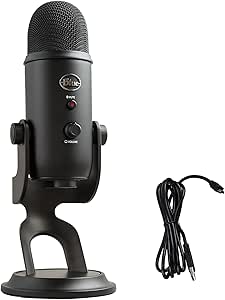 | Best for Developers Who Also Create Content | Connectivity: USB | Microphone type: Condenser | Capsule array: Tri-capsule | VIEW LATEST PRICE | See Our Full Breakdown |
| MAONO UL10 USB Lavalier Microphone, 192kHz/24bit for Interview and Vlogging |  | Best Compact Wearable Pick | Connectivity: USB | Form factor: Lavalier | Polar pattern: Omnidirectional | VIEW LATEST PRICE | See Our Full Breakdown |
| Magnetic USB Microphone for PC/Mac, Flat Mount, 2m Cable |  | Best for Flexible Mounting | Connectivity: USB | Connector: USB-C to USB-A cable | Polar pattern: Omnidirectional | VIEW LATEST PRICE | See Our Full Breakdown |
| Sennheiser Profile USB Cardioid Condenser Microphone with Table Stand |  | Best Overall for Desk-Based Developer Calls | Microphone type: Condenser | Polar pattern: Cardioid (unidirectional) | Connectivity: USB-C | VIEW LATEST PRICE | See Our Full Breakdown |
| CMTECK G009 USB Desktop Microphone with Mute Button |  | Best for Windows Call Workstations | Microphone type: Condenser | Connectivity: USB | Form factor: Desktop microphone with flexible metal gooseneck | VIEW LATEST PRICE | See Our Full Breakdown |
| FIFINE K669B USB Condenser Microphone |  | Best Value for a Simple Desk Setup | Microphone type: Condenser | Polar pattern: Unidirectional (cardioid) | Connectivity: USB; included USB-B to USB-A/C cable | VIEW LATEST PRICE | See Our Full Breakdown |
| Seeed Studio reSpeaker XVF3800 USB Microphone Array, Bare Board |  | Best for Voice-Enabled Developer Projects | Microphone array: Four digital MEMS microphones | Pickup direction: 360 degrees | Pickup range: Up to 5 meters | VIEW LATEST PRICE | See Our Full Breakdown |
| Samson Q2U USB-C Dynamic Microphone Recording and Podcasting Pack | 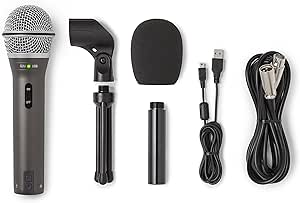 | Best for Developers Who Want an Upgrade Path | Microphone type: Dynamic | Polar pattern: Unidirectional | Connectivity: USB-C and XLR | VIEW LATEST PRICE | See Our Full Breakdown |
| USB microphones for developer | Connectivity | Polar pattern | Microphone type | Signal-to-noise ratio |
|---|---|---|---|---|
| USB Microphone for Laptop Goos | USB | Omnidirectional | — | 60 dB |
| KISEER USB 2.0 Mini Microphone | USB 2.0 | Omnidirectional | — | 96 dB |
| FIFINE AmpliGame AM8 USB/XLR D | USB and XLR | Unidirectional cardioid | Dynamic | 80 dB |
| ZealSound K66 USB Podcast Micr | USB with USB-C and Lightning adapters | — | USB condenser | — |
| DUNGZDUZ Mini USB Microphone f | USB 2.0 | Omnidirectional | — | 60 dB |
| TONOR G11 USB Conference Micro | USB | Omnidirectional | Condenser | 78 dB |
| JOUNIVO JV-601 USB Gooseneck M | USB | — | Omnidirectional condenser | 76 dB |
| Logitech Blue Yeti USB Microph | USB | — | Condenser | — |
| MAONO UL10 USB Lavalier Microp | USB | Omnidirectional | — | 78 dB |
| Magnetic USB Microphone for PC | USB | Omnidirectional | — | — |
| Sennheiser Profile USB Cardioi | USB-C | Cardioid (unidirectional) | Condenser | — |
| CMTECK G009 USB Desktop Microp | USB | — | Condenser | — |
| FIFINE K669B USB Condenser Mic | USB; included USB-B to USB-A/C cable | Unidirectional (cardioid) | Condenser | — |
| Seeed Studio reSpeaker XVF3800 | USB; I2S mode via DFU firmware reflash | — | — | — |
| Samson Q2U USB-C Dynamic Micro | USB-C and XLR | Unidirectional | Dynamic | 70 dB |
More Details on Our Top Picks
USB Microphone for Laptop Gooseneck Mini USB Computer Microphone
The adjustable metal gooseneck makes this a practical pick for developers who want a microphone positioned near their mouth without taking up desk space. It plugs into USB-A with no driver setup, and its 28 g body is easy to pack for a portable workstation. The omnidirectional pickup is specified for clear voice capture within 30 cm, so it suits close-range stand-ups and calls better than trying to capture a room. Compared with the pocket-sized DUNGZDUZ Mini USB Microphone, this model gives you a flexible arm for aiming the capsule, but both use omnidirectional pickup and can capture nearby office noise. There is no inline mute or volume control, and the listed extension-cable limitation may matter if your computer’s ports are awkwardly placed.
Pros:- Adjustable metal carbon steel gooseneck helps position the mic close to the speaker.
- USB plug-and-play operation requires no driver installation or external power.
- Compact 28 g design is easy to carry between workspaces.
- Specified for clear voice capture within 30 cm.
Cons:- Omnidirectional pickup can capture keyboard and room noise.
- No inline mute or volume control.
- Performance may be affected when used with an external USB extension cable.
Best for: Developers who work at a laptop or desktop and want a lightweight USB-A mic that can be bent into a consistent close-talk position.
Not ideal for: People who need a physical mute button, a long-reach setup, or focused background rejection for calls in a noisy shared office.
- Connectivity:USB
- Connector:USB
- Polar pattern:Omnidirectional
- Form factor:Gooseneck
- Signal-to-noise ratio:60 dB
- Channels:1
- Weight:28 g
- Enclosure material:ABS and metal
Our verdict“Choose this gooseneck model if you want a small, positionable mic for close-range developer calls and can manage mute and levels in software.”
KISEER USB 2.0 Mini Microphones, 2-Pack
The KISEER set is the most practical choice here when the goal is to equip two computers with simple voice-chat mics, rather than build a more controlled recording setup. Each USB 2.0 microphone is compact and plug-and-play, so a developer can keep one at a home desk and another in a travel bag, or share the pair across two PCs. Its stated background noise filtering is a useful distinction from the basic gooseneck model, though the omnidirectional pattern still means nearby room sounds may reach the mic. Compared with the single DUNGZDUZ mini mic, KISEER supplies two units, but its plastic enclosure and PC-focused compatibility make it less appealing for varied devices or rough daily travel. Neither mic offers the physical controls found on the ZealSound K66.
Pros:- Two microphones cover separate computers or provide a ready spare.
- Compact 23 g design is easy to carry.
- Plug-and-play USB 2.0 setup needs no driver installation.
- Background noise filtering is included.
Cons:- Plastic enclosure is less robust than a metal-bodied option.
- Designed for laptops and desktop PCs, limiting use with other device types.
- Omnidirectional pickup offers less isolation from nearby office sounds than a cardioid mic.
Best for: Developers who need basic USB voice capture at two laptop or desktop stations, or want a spare mic for a second PC.
Not ideal for: Buyers seeking one higher-control microphone for noisy calls, mobile-device use, or deliberate audio monitoring.
- Quantity:2 microphones
- Connectivity:USB 2.0
- Polar pattern:Omnidirectional
- Audio sensitivity:30 dB
- Signal-to-noise ratio:96 dB
- Channels:1
- Weight:23 g each
- Enclosure material:Plastic
Our verdict“Pick the KISEER pair if you need inexpensive-to-deploy basic voice capture for two PCs and do not need physical controls or broad device support.”
FIFINE AmpliGame AM8 USB/XLR Dynamic Microphone for Gaming Streaming
The FIFINE AmpliGame AM8 is the strongest fit in this group for a developer who also streams or records, because its cardioid dynamic design and hands-on controls go beyond basic meeting audio. USB keeps setup straightforward, while the option to switch to XLR gives an upgrade path to a separate audio interface. The tap-to-mute button with LED, gain control, and headphone monitoring are useful when managing a live call or stream without reaching for software controls. Compared with the ZealSound K66, the AM8 adds XLR connectivity and a dynamic capsule, while the K66 offers broader stated mobile compatibility and echo control. The tradeoff is a more involved desk setup, and RGB and its function keys work only over USB; XLR use also requires a separately supplied cable.
Pros:- USB and XLR connectivity support both direct computer use and a later audio-interface setup.
- Cardioid dynamic pickup is suited to focused close-range voice capture.
- Tap-to-mute button has an LED indicator for visible mute status.
- Headphone monitoring and built-in gain control allow on-mic adjustments.
Cons:- XLR cable is not included.
- RGB lighting and function keys are available only over USB.
- Larger feature set is less portable and simple than the mini USB microphones in this roundup.
Best for: Developers who stream coding sessions, record voice content, or want a USB mic that can later connect to an XLR audio setup.
Not ideal for: People seeking a tiny travel mic, a minimal video-call setup, or a complete XLR kit with cable included.
- Microphone type:Dynamic
- Connectivity:USB and XLR
- Polar pattern:Unidirectional cardioid
- Frequency response:50 Hz–16 kHz
- Signal-to-noise ratio:80 dB
- Controls and monitoring:Gain control, tap-to-mute, headphone monitoring
- Mounting threads:3/8 in and 5/8 in
- Materials:ABS plastic and metal
Our verdict“Choose the AM8 if developer calls are only part of your workload and you want physical controls plus a path from USB to XLR recording.”
ZealSound K66 USB Podcast Microphone with Noise Reduction, Gain and Mute Controls
For developers who want to adjust their call setup at the microphone rather than in an app, the K66 offers a useful cluster of physical level, monitoring, echo, and mute controls. Its cardioid pickup and noise reduction mode make it better suited to a single speaker at a desk than the omnidirectional KISEER pair, which is more about portable simplicity than directional voice capture. The zero-latency headphone monitoring can help catch a muted or overly quiet input before a meeting or recording goes too far. USB connectivity, with USB-C and Lightning adapters listed, also gives it wider stated device support than the USB-A mini mics. The tradeoff is that noise reduction requires a long press of the mute button, so its operation is less direct than a dedicated control, and mobile use depends on device and adapter support.
Pros:- Cardioid pickup and noise reduction mode are suited to focused solo voice capture.
- Physical microphone and monitoring level controls reduce reliance on software menus.
- Zero-latency headphone monitoring supports live input checks.
- Mute control includes an LED indicator, with USB-C and Lightning adapters listed.
Cons:- Noise reduction is activated by pressing and holding the mute button.
- Mobile compatibility depends on adapter and device support.
- More desk-oriented than the compact gooseneck and mini USB options.
Best for: Developers who take frequent calls or record solo voice at a desk and want physical controls, headphone monitoring, and stated support for computers and selected mobile devices.
Not ideal for: Buyers who prioritize pocketable size, XLR connectivity, or a simple dedicated noise-reduction switch.
- Microphone type:USB condenser
- Pickup pattern:Cardioid
- Frequency response:40 Hz–18 kHz
- Sampling rate:46 kHz
- Sensitivity:−45 dB ±3 dB
- Monitoring:3.5 mm headphone jack with zero-latency monitoring
- Controls:Microphone volume, monitoring volume, echo adjustment, mute
- Connectivity:USB with USB-C and Lightning adapters
Our verdict“Choose the K66 if you want a controlled desk-call setup with a physical mute and monitoring, rather than a pocket-sized plug-in mic.”
DUNGZDUZ Mini USB Microphone for Laptop & Desktop
The DUNGZDUZ mini stands out for developers who need a small USB mic across a mixed computing setup: its listed compatibility includes Windows, Mac, Linux, Chromebook, and Raspberry Pi. At 50 g, it remains portable, and its plug-and-play USB-A connection suits straightforward conferencing without drivers. The product claims voice capture up to 10 feet, but its omnidirectional pattern means that reach can also bring in keyboard and room noise; it is not a substitute for a close-positioned cardioid mic such as the ZealSound K66. Compared with the KISEER two-pack, DUNGZDUZ is a single-mic choice with broader listed compatibility and a stated 12-month warranty. USB-A may require an adapter on newer laptops, and the supplied details do not list physical mute or gain controls.
Pros:- Listed compatibility includes Windows, Mac, Linux, Chromebook, and Raspberry Pi.
- USB 2.0 plug-and-play setup requires no driver installation.
- Compact 50 g design is easy to carry.
- Noise reduction is listed as a feature, with a 12-month warranty.
Cons:- Omnidirectional pickup may capture keyboard and room noise.
- USB Type-A may require an adapter for USB-C-only laptops.
- Not positioned for professional studio recording and has no listed physical mute or gain controls.
Best for: Developers using Linux, Raspberry Pi, or several laptop platforms who want a portable, driver-free mic for calls and online classes.
Not ideal for: People recording in noisy rooms, pursuing studio-style results, or using a USB-C-only laptop without an adapter.
- Model:CGS-M3
- Connectivity:USB 2.0
- Connector:USB Type-A
- Polar pattern:Omnidirectional
- Frequency response:50–15,000 Hz
- Signal-to-noise ratio:60 dB
- Weight:50 g
- Dimensions:0.71 × 0.31 × 1.89 in
- Warranty:12 months
Our verdict“Choose the DUNGZDUZ if cross-platform compatibility and portability matter more than directional pickup or on-mic controls.”
TONOR G11 USB Conference Microphone for PC and Mac
The TONOR G11 is suited to developers who need a desk mic to pick up several people during stand-ups or remote workshops, rather than a close-mic sound for solo narration. Its 360-degree pickup reaches up to 11.5 feet, giving it a wider meeting footprint than the position-focused JOUNIVO JV-601 gooseneck. USB plug-and-play and a physical mute button keep setup and meeting controls simple on Windows or macOS. Its metal body and anti-slip base also help it stay put on a shared desk. The tradeoff is that an omnidirectional mic can capture room noise along with voices, and the G11 is only a microphone—it does not provide speakerphone audio. Choose it for group pickup; for adjustable placement near one speaker, the JOUNIVO is the more targeted fit.
Pros:- Omnidirectional pickup covers voices around a shared desk, with a stated range up to 11.5 feet.
- USB plug-and-play setup works with Windows and macOS without driver installation.
- Physical mute button and blue status light make meeting muting easy to check.
- Metal construction and an anti-slip base help keep the mic stable on a desk.
Cons:- Wide omnidirectional pickup can capture keyboard noise and other sounds around the room.
- It has no speaker, so meeting audio still needs a separate output device.
- Corded USB connection limits placement to the cable’s reach.
Best for: Developers who regularly host small in-person stand-ups or meetings around one shared computer and need voices picked up from multiple directions.
Not ideal for: Solo developers in noisy rooms who want background rejection, or buyers expecting a complete speakerphone rather than a microphone.
- Connectivity:USB
- Microphone type:Condenser
- Polar pattern:Omnidirectional
- Pickup distance:Up to 11.5 ft
- Compatibility:Windows and macOS
- Mute function:Yes, with blue status light
- Signal-to-noise ratio:78 dB
- Cable length:1.8 m
Our verdict“Choose the TONOR G11 for shared-desk meetings where wide voice pickup matters more than isolating one speaker.”
JOUNIVO JV-601 USB Gooseneck Microphone
The JOUNIVO JV-601 suits developers who want a desktop mic they can bend toward their speaking position without rearranging the whole workspace. Its flexible 360-degree gooseneck offers more direct placement than the TONOR G11, whose broad room pickup better suits shared meetings. The JV-601 is still omnidirectional, so its noise-canceling feature should not be mistaken for a directional pickup pattern; it is designed to reduce background noise and echo, but a busy room can remain a challenge. Driver-free USB setup, a one-touch mute button, and an LED status indicator make it practical for daily calls. The key limits are single-channel audio and narrow device support: it works with Windows and macOS computers, not Android, Xbox, or Raspberry Pi.
Pros:- Flexible 360-degree gooseneck makes it easy to adjust microphone position at a desk.
- USB plug-and-play connection requires no driver on compatible computers.
- One-touch mute button and LED indicator provide visible meeting controls.
- Noise-canceling technology is designed to help reduce background noise and echo.
Cons:- Omnidirectional pickup can still capture sounds from around the desk.
- Single-channel audio does not suit buyers seeking stereo capture.
- Not compatible with Android, Xbox, or Raspberry Pi.
Best for: Developers on Windows or macOS who want a bendable desk mic that can be positioned near their usual speaking spot during calls.
Not ideal for: Developers who need Android, Xbox, or Raspberry Pi compatibility, or stereo and multi-channel recording.
- Connectivity:USB
- Microphone type:Omnidirectional condenser
- Form factor:Flexible gooseneck
- Cable length:6 ft (1.8 m)
- Frequency range:20 Hz–20 kHz
- Signal-to-noise ratio:76 dB
- Channels:1
- Compatibility:Windows 7, 8, 10, 11 and macOS; not Xbox, Raspberry Pi, or Android
Our verdict“Pick the JV-601 if you want adjustable close placement on a supported computer, rather than the TONOR G11’s wider shared-room coverage.”
Logitech Blue Yeti USB Microphone with Blue VO!CE, Four Pickup Patterns, and Adjustable Stand
The Blue Yeti is the most adaptable option here for developers whose mic needs extend from daily calls to demos, podcasts, or streaming. Its four pickup patterns let one device handle solo speech, a two-person conversation, or broader room capture; neither the TONOR G11 nor JOUNIVO JV-601 offers that range. Onboard gain, mute, pattern, and headphone controls also make adjustments available without relying on meeting software. The compromise is extra setup: full functionality uses Logitech G HUB and Blue VO!CE, while simpler USB mics in this group are more straightforward for calls alone. Its adjustable desktop stand takes up more space than a lavalier such as the MAONO UL10, and its corded design keeps it tied to the desk. This is a flexible creator mic, not the smallest plug-in-and-forget choice.
Pros:- Four pickup patterns support solo speech, stereo capture, and different group arrangements.
- Onboard mute, gain, pattern, and headphone-volume controls make adjustments accessible at the mic.
- Adjustable desktop stand helps aim the microphone toward the speaker.
- USB connection supports use with PC and Mac.
Cons:- Full functionality requires installing Logitech G HUB.
- Larger desktop setup is less discreet than the MAONO UL10 lavalier.
- Corded operation restricts placement to the USB cable’s reach.
Best for: Developers who record technical demos, tutorials, podcasts, or streams as well as joining work calls, and want several recording patterns in one desk mic.
Not ideal for: Developers who only need a compact meeting mic, want a minimal software setup, or have limited desk space.
- Connectivity:USB
- Microphone type:Condenser
- Capsule array:Tri-capsule
- Pickup patterns:Cardioid, omnidirectional, bidirectional, stereo
- Frequency response:20 Hz–20 kHz
- Channels:2
- Controls:Headphone volume, pattern selection, mute, microphone gain
- Compatibility:PC and Mac
Our verdict“Choose the Blue Yeti if you need one desktop microphone for both developer calls and varied content recording, and can accommodate its software and desk footprint.”
MAONO UL10 USB Lavalier Microphone, 192kHz/24bit for Interview and Vlogging
The MAONO UL10 is the compact choice for developers who record walkthroughs, interviews, or presentations while moving away from their desk. Its clip-on lavalier form keeps the microphone attached to clothing, unlike the desktop Blue Yeti or the meeting-focused TONOR G11. The stated 192 kHz/24-bit recording format may appeal to creators who want high-resolution capture, while USB plug-and-play keeps computer setup simple. A foam windscreen is included to help manage plosives, but the omnidirectional capsule can also pick up room sound; it is not a substitute for a mic designed to reject a noisy environment. The UL10’s USB-only connection also limits use with devices lacking a compatible USB input, and there is no built-in battery for untethered recording.
Pros:- Lavalier form factor clips to clothing and stays close to the speaker.
- USB plug-and-play connection supports PC, Mac, and laptops.
- Supports 192 kHz/24-bit recording according to the product description.
- Includes a foam windscreen to help reduce plosives.
Cons:- Omnidirectional pickup can capture background noise in busy spaces.
- USB-only connectivity limits use with devices without a compatible USB connection.
- No built-in battery for untethered recording.
Best for: Developers recording on-camera tutorials, interviews, or presentations who want a small clip-on mic connected directly to a PC or Mac.
Not ideal for: Developers seeking a stationary conference mic for multiple speakers, or recording in noisy rooms where broad pickup may capture distractions.
- Connectivity:USB
- Form factor:Lavalier
- Polar pattern:Omnidirectional
- Recording format:192 kHz / 24-bit
- Signal-to-noise ratio:78 dB
- Audio sensitivity:30 dB
- Enclosure material:Metal
- Weight:80 g
Our verdict“Pick the MAONO UL10 for close, wearable voice capture during on-camera work, rather than the Blue Yeti’s desk-based multi-pattern flexibility.”
Magnetic USB Microphone for PC/Mac, Flat Mount, 2m Cable
This magnetic USB microphone stands out for developers who want to move a mic between a desk, clothing, or a metal surface without a conventional stand. Its flat-mount design gives it more placement options than the JOUNIVO JV-601, which is built around a fixed desktop base and gooseneck. A mute button with LED status makes it easier to check call state, while plug-and-play USB connectivity is intended for Windows and macOS. The listing describes AI noise reduction, but the mic remains omnidirectional, so that feature does not change its broad pickup pattern or guarantee isolation in a noisy room. The USB-C-to-USB-A cable may also complicate setup for developers with USB-C-only computers. It is a flexible mounting pick, not the clearest choice for those prioritizing proven directional pickup or detailed recording controls.
Pros:- Magnetic flat-mount design allows placement on desks, clothing, or metal surfaces.
- Omnidirectional pickup covers sound from multiple directions.
- Mute button and LED indicator provide visible call controls.
- Plug-and-play USB connection is listed for Windows and macOS.
Cons:- Supplied cable runs from USB-C to USB-A, which may require an adapter for USB-C-only computers.
- Omnidirectional pickup can collect background sound despite the listed noise-reduction feature.
- Single-channel design does not provide stereo capture.
Best for: Developers who want to reposition a single-channel mic between a desk, clothing, and nearby metal surfaces during calls or streams.
Not ideal for: Developers with USB-C-only computers who lack an adapter, or those who need stereo capture or a specified directional pickup pattern.
- Connectivity:USB
- Connector:USB-C to USB-A cable
- Polar pattern:Omnidirectional
- Form factor:Desktop, flat-mount design
- Cable length:2 m
- Channels:1
- Special features:Magnetic design, mute function, noise reduction, plug and play
- Power source:USB
Our verdict“Choose this model if flexible magnetic placement is your priority; choose the JOUNIVO JV-601 instead for a more conventional adjustable desktop position.”
Sennheiser Profile USB Cardioid Condenser Microphone with Table Stand
The Sennheiser Profile is my strongest fit for developers who want a straightforward desk mic with hands-on control. Its USB-C connection and plug-and-play setup avoid the extra gear an XLR mic can require, while the gain, mix, volume, and mute controls make it easy to adjust or silence audio without hunting through call settings. The headphone jack supports real-time monitoring, useful when recording demos or checking how a remote meeting sounds.
Compared with the FIFINE K669B, the Profile adds mix control and headphone monitoring, but its compact table stand offers less positioning reach than an adjustable arm. Its fixed cardioid pattern is well suited to one speaker at a desk, not a group gathered around the microphone. I’d choose it for a polished, low-fuss workstation, but not for multi-person room capture.
Pros:- Plug-and-play USB-C setup needs no external audio interface.
- Physical gain, mix, volume, and mute controls offer quick adjustments during calls.
- Built-in headphone jack supports zero-latency monitoring.
- Metal housing provides a durable desk-ready build.
Cons:- Fixed cardioid pickup is intended for one speaker rather than a group.
- Included compact table stand limits positioning compared with a boom arm.
- USB-C may require an adapter for computers with only USB-A ports.
Best for: Developers who spend much of the workday on calls, record occasional walkthroughs, and want tactile controls plus headphone monitoring at their desk.
Not ideal for: Teams recording several people around one table, or developers who need flexible boom-arm positioning or a microphone with multiple pickup patterns.
- Microphone type:Condenser
- Polar pattern:Cardioid (unidirectional)
- Connectivity:USB-C
- Controls:Mute, gain, mix, and volume
- Monitoring:Built-in headphone jack
- Housing:Metal
- Weight:350 g
- Compatibility:PC, Mac, tablet, and mobile
Our verdict“Choose the Profile for a controlled, single-speaker developer desk setup with convenient onboard adjustments and monitoring.”
CMTECK G009 USB Desktop Microphone with Mute Button
The CMTECK G009 suits a developer who wants a simple desktop mic that can be aimed toward the speaker and muted with a physical button. Its flexible gooseneck is more adjustable than the fixed compact stand on the Sennheiser Profile, and the LED gives a visible cue for mute and connection status—handy when switching between calls and focused coding. USB power keeps setup uncomplicated, with no separate power supply required.
There’s a meaningful compatibility limit: the supplied data lists Windows, Mac, and PS4 support, but excludes Linux, Raspberry Pi, and Android. That makes it a poor match for many developer test machines. The product information also conflicts on whether its pickup pattern is omnidirectional or unidirectional, so I would not select it for a specific room-coverage requirement. It is a practical Windows-oriented call mic, not the most dependable choice for varied development environments.
Pros:- Flexible gooseneck lets the speaker position the microphone without moving the base.
- Mute button and LED provide a visible status check during calls.
- USB-powered plug-and-play setup requires no separate power supply.
- Pop filter helps reduce plosive sounds in close speech.
Cons:- Listed compatibility excludes Linux, Raspberry Pi, and Android.
- Product details conflict on whether the pickup pattern is omnidirectional or unidirectional.
- Mono-channel design offers no stereo capture.
Best for: Windows or Mac developers who want an inexpensive-to-set-up desk microphone with an adjustable neck and visible mute status.
Not ideal for: Linux, Raspberry Pi, or Android users, and buyers who need a clearly specified pickup pattern for a particular room setup.
- Microphone type:Condenser
- Connectivity:USB
- Form factor:Desktop microphone with flexible metal gooseneck
- Pickup pattern:Conflicting listing information: omnidirectional in description, unidirectional in specifications
- Mute status:Button with LED indicator
- Channels:1
- Listed compatibility:Windows 7, 8, and 10; Mac OS; PS4
- Listed incompatibility:Raspberry Pi, Linux, and Android
Our verdict“Pick the G009 for straightforward Windows or Mac calls if its platform limits and unclear pickup-pattern details fit your setup.”
FIFINE K669B USB Condenser Microphone
The FIFINE K669B keeps the developer desk setup uncomplicated: connect it by USB, point its cardioid pickup toward yourself, and use the built-in knob for level adjustment. Its metal enclosure and straightforward controls make it a more substantial-feeling option than a tiny laptop mic, while the unidirectional pattern is intended to favor your voice over sound from elsewhere in the room.
Compared with the Sennheiser Profile, the K669B is the more basic choice: it has a volume control but no listed headphone monitoring or mix control. That makes it less useful for checking recorded audio directly from the mic, but also keeps its operation simple. The supplied cable supports USB-A and USB-C connections, though the mic is not listed as compatible with Xbox or mobile phones. I’d pick it for routine calls and solo recordings, not a setup that needs monitoring or broad device support.
Pros:- Cardioid pickup is suited to focusing on one speaker at a desk.
- Built-in volume knob allows direct level adjustment.
- Metal enclosure gives the microphone a sturdy construction.
- Included 6.5-foot cable supports USB-A and USB-C connections.
Cons:- No headphone monitoring or mix control is listed.
- Not compatible with Xbox or mobile phones according to the supplied product data.
- Desktop form factor offers less flexible placement than a gooseneck mic.
Best for: Developers who want a durable, plug-and-play microphone for solo calls, screen recordings, and desk-based voice work on a computer or supported console.
Not ideal for: Xbox or mobile-phone users, and developers who want a headphone jack, mix control, or more advanced monitoring features.
- Microphone type:Condenser
- Polar pattern:Unidirectional (cardioid)
- Connectivity:USB; included USB-B to USB-A/C cable
- Cable length:6.5 ft
- Controls:Built-in volume control
- Frequency response:20 Hz–20 kHz
- Enclosure:Metal
- Listed compatible devices:Laptop, desktop, PC, PS4, and PS5
Our verdict“Choose the K669B for uncomplicated solo developer calls on a computer when basic level control matters more than monitoring features.”
Seeed Studio reSpeaker XVF3800 USB Microphone Array, Bare Board
The reSpeaker XVF3800 is the specialist pick here: rather than a finished desk microphone, it is a four-microphone array built for voice interfaces, meeting-room capture, and embedded development. Its 360-degree pickup and onboard processing—including echo cancellation, beamforming, noise suppression, and voice detection—can support projects where speakers move around the device or where room sound needs processing. It also offers plug-and-play USB operation, with listed support for Linux, Raspberry Pi, and NVIDIA Jetson.
That makes it a very different choice from the Sennheiser Profile or FIFINE K669B, which are more ready-made for one person’s desk calls. The reSpeaker’s bare-board format may require enclosure and project integration, and its I2S mode requires a firmware reflash plus an external MCU. I’d choose it for prototyping voice-enabled tools, not as the simplest finished microphone for everyday developer meetings.
Pros:- Four-microphone array captures sound from 360 degrees, with a listed range up to 5 meters.
- Onboard processing includes echo cancellation, beamforming, dereverberation, voice detection, and noise suppression.
- USB audio firmware is pre-installed for plug-and-play operation.
- Supports USB use and reflashable I2S integration for embedded projects.
Cons:- Bare-board format may need additional enclosure and integration work.
- I2S operation requires a firmware reflash and an external MCU.
- Its room-focused array is less tailored to a single speaker at a personal desk than the Profile or K669B.
Best for: Developers building voice interfaces, embedded prototypes, or shared-room capture systems who can work with a bare board and its integration requirements.
Not ideal for: Anyone seeking a finished desktop microphone for personal calls, or users unwilling to reflash firmware and connect an external MCU for I2S projects.
- Microphone array:Four digital MEMS microphones
- Pickup direction:360 degrees
- Pickup range:Up to 5 meters
- Processor:XMOS XVF3800
- Audio processing:AEC, adaptive beamforming, dereverberation, DoA, VAD, dynamic noise suppression, and 60 dB AGC
- Connectivity:USB; I2S mode via DFU firmware reflash
- Compatible systems:Windows, macOS, Linux, Raspberry Pi, and NVIDIA Jetson
- I2S requirement:External MCU, such as ESP32 or Arduino
Our verdict“Choose the reSpeaker XVF3800 for development projects that benefit from room-scale voice capture and onboard processing, not for a ready-to-use personal desk mic.”
Samson Q2U USB-C Dynamic Microphone Recording and Podcasting Pack
The Samson Q2U is the most flexible long-term pick for a developer who may move from computer calls into a more involved recording setup. It combines USB-C and XLR connectivity, so it can connect directly to a computer now and work with traditional audio equipment later. The included stand, extension arm, clip, windscreen, and cables also make it a more complete kit than the standalone FIFINE K669B.
Its unidirectional pattern is aimed at one speaker, a useful fit for desk recordings rather than room-wide group capture like the reSpeaker XVF3800. The tradeoff is a more involved setup than a compact plug-and-play desk mic, and the supplied data lists PC compatibility without the broader platform coverage stated for some alternatives. At 11.2 ounces, it is also relatively heavy for handheld use. I’d choose it when dual connectivity and included mounting gear matter more than minimal size.
Pros:- USB-C and XLR connections support computer use and later integration with traditional audio equipment.
- Bundle includes a desktop tripod stand, extension arm, clip, windscreen, and USB-C and XLR cables.
- Unidirectional pickup is suited to a single speaker.
- Metal enclosure provides a durable build.
Cons:- At 11.2 ounces, it may feel heavy for extended handheld use.
- Listed compatibility is limited to PC, leaving other platforms unspecified in the supplied data.
- The included mounting kit takes more space than a compact desktop microphone.
Best for: Developers who record solo tutorials or podcasts on a computer now and want the option to connect the same microphone to XLR audio gear later.
Not ideal for: Buyers who need a lightweight handheld mic, room-wide group pickup, or verified compatibility beyond the listed PC platform.
- Microphone type:Dynamic
- Polar pattern:Unidirectional
- Connectivity:USB-C and XLR
- Frequency range:50 Hz–15 kHz
- Signal-to-noise ratio:70 dB
- Included accessories:Tripod desktop stand, extension arm, mic clip, windscreen, USB-C cable, and XLR cable
- Enclosure:Metal
- Weight:11.2 oz
Our verdict“Choose the Q2U if you want a single-speaker mic with included mounting accessories and a clear path from USB-C recording to XLR gear.”
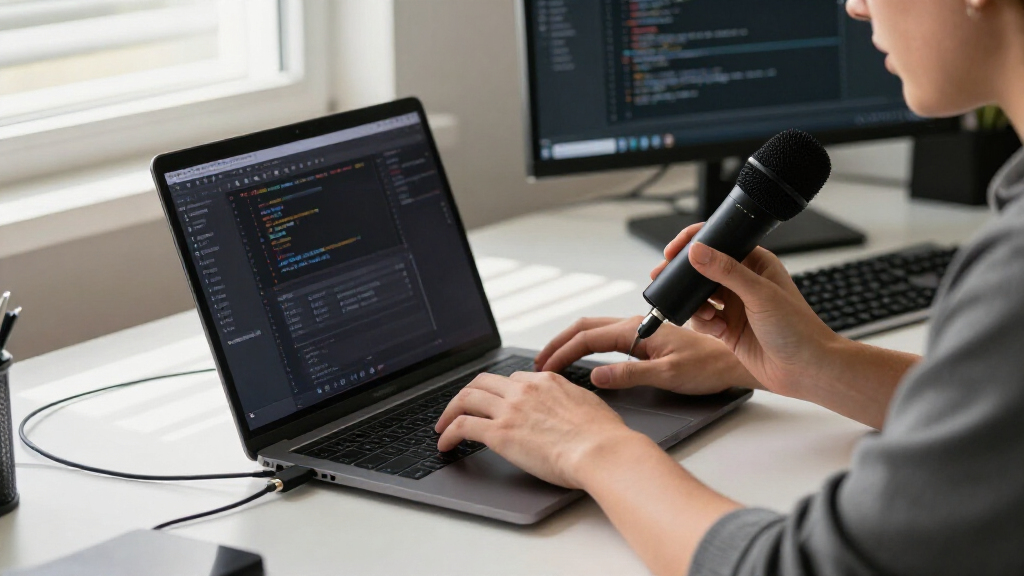
How We Picked
I ranked these microphones around common developer tasks: daily video calls, remote pair programming, screen recordings, tutorials, podcasts, and occasional shared-room meetings. The main criteria were how readily a microphone connects to a computer, how its pickup pattern fits solo or group speech, how much control it offers at the desk, and whether its form factor suits a fixed setup or a mobile one. I also weighed upgrade options, setup demands, and likely workflow limits; a bare microphone array and a tiny plug-in mic serve very different needs, even though both connect over USB.
The order favors useful performance and manageable setup for the broadest range of developers, not the longest feature list. The Profile leads as a focused, uncomplicated desk option; the AM8 ranks highly for people who value USB/XLR flexibility; and meeting-oriented and compact models rank better for their specific jobs than as universal picks. Products with fewer controls, limited placement flexibility, or a specialist setup receive narrower recommendations. I do not treat every microphone as interchangeable: the best choice depends on whether one person speaks close to the mic, several people share a table, or the device must travel between workstations.
| USB microphones for developer | Polar pattern | Microphone type |
|---|---|---|
| USB Microphone for Laptop Goos | Omnidirectional | — |
| KISEER USB 2.0 Mini Microphone | Omnidirectional | — |
| FIFINE AmpliGame AM8 USB/XLR D | Unidirectional cardioid | Dynamic |
| ZealSound K66 USB Podcast Micr | — | USB condenser |
| DUNGZDUZ Mini USB Microphone f | Omnidirectional | — |
| TONOR G11 USB Conference Micro | Omnidirectional | Condenser |
| JOUNIVO JV-601 USB Gooseneck M | — | Omnidirectional condenser |
| Logitech Blue Yeti USB Microph | — | Condenser |
| MAONO UL10 USB Lavalier Microp | Omnidirectional | — |
| Magnetic USB Microphone for PC | Omnidirectional | — |
| Sennheiser Profile USB Cardioi | Cardioid (unidirectional) | Condenser |
| CMTECK G009 USB Desktop Microp | — | Condenser |
| FIFINE K669B USB Condenser Mic | Unidirectional (cardioid) | Condenser |
| Seeed Studio reSpeaker XVF3800 | — | — |
| Samson Q2U USB-C Dynamic Micro | Unidirectional | Dynamic |
Factors to Consider When Choosing USB Microphones For Developers
Before choosing a USB microphone, I would start with the shape of the workday rather than a headline audio specification. A daily one-person standup, a recorded coding tutorial, and a conference-room call create different demands for mic position, pickup, and portability. These factors help prevent a common mismatch: buying a microphone with capabilities you will not use while overlooking the feature that would improve your actual setup.
Match Pickup Style to Who Is Speaking
For solo calls, a microphone intended to capture speech from the person sitting in front of it usually makes more sense than a room-focused option. A directional mic placed near your mouth can reduce how much distant keyboard, fan, and room sound reaches the recording, though placement matters as much as the pickup label. For meetings around one table, a small desktop conference mic may be more practical than asking every participant to lean toward one desk microphone. Do not assume a wider pickup pattern is automatically better: it can capture more of the room along with more voices. If your calls include both solo work and group meetings, decide which happens more often and choose for that use first. A headset can still be the more reliable choice when you need consistent speech pickup in a noisy shared space.
Plan the Microphone’s Position Before Buying
A microphone that sounds capable on paper may be awkward if it sits behind a monitor or too far from your mouth. Check the distance from your keyboard to the intended mic position, the height of your screen, and whether the stand or cable will compete for desk space. A gooseneck or flat-mounted model can fit locations where a larger stand would block equipment, but its placement may be less adjustable. Close positioning often helps speech stand out without relying on aggressive software processing. Avoid putting a sensitive mic directly beside a laptop fan or resting its stand against a surface that carries keyboard taps. If the desk changes between home and office, portability and a quick, repeatable setup may matter more than a permanent mount.
Choose Controls That Fit Your Meeting Habits
A physical mute button is useful when you often cough, type, or speak to someone in the room during calls. A gain control can help adjust input level at the microphone, but changing it casually between calls can create inconsistent volume; set it deliberately and verify the result in your conferencing software. Do not confuse a mute button with noise cancellation: muting stops your microphone from sending sound, while noise handling concerns what reaches the listener while it is active. Software controls can add flexibility, but they may depend on a particular operating system or app. For a dependable work setup, prioritize controls you can reach without searching through menus. If you rarely adjust settings, a simpler microphone can be easier to manage than one built around multiple controls.
Think Through USB, XLR, and Your Computer Setup
USB is the convenient route for developers who want to connect a microphone directly to a computer and get on with a call. USB/XLR models cost you some portability and desk simplicity, but the XLR connection can be useful if you later add an audio interface or mixer. Check connector type, cable arrangement, and operating-system support against the computer you actually use, especially if your setup includes docks, hubs, or a tablet. A USB microphone may appear straightforward yet still compete with other devices for a port or require a longer cable than supplied. Avoid buying XLR capability solely as a vague future-proofing measure if you have no plan to add audio gear. A direct USB model is often the cleaner choice for a work-only desk.
Separate Call Quality from Recording Ambitions
A microphone that makes your voice clear in a video call does not automatically provide the workflow you want for a podcast or a polished tutorial. Recording can call for closer placement, more consistent room conditions, and a way to monitor sound before you publish. Multiple pickup patterns are useful when you truly change between solo speech and group recording, but they add choices that many call-focused users will never touch. A dynamic model can be a sensible fit for a less controlled room, while a condenser may suit a quieter desk and a more deliberate recording setup. Treat sample-rate and bit-depth claims as one part of the decision rather than a promise of better results in every application. Room acoustics, mic distance, and speaking habits often matter more to the finished audio.
Account for Setup, Portability, and Long-Term Fit
Small plug-in microphones are easy to carry and take little desk space, but they give you fewer options for aiming the capsule or adding useful controls. Larger stand-mounted models are easier to position deliberately, yet they can crowd a compact workspace and pick up vibration if placed carelessly. A bare microphone array belongs in a different buying category: it may suit an embedded or experimental voice project, but it is not the same as a finished desktop product. Before choosing, ask whether you will use the mic at one desk, move it between locations, or build it into a system. For a long-term purchase, value comes from fitting that routine rather than paying for features that stay unused. Simpler gear can be the better investment when it removes setup friction from daily calls.
Frequently Asked Questions
Do I need a dedicated microphone if my laptop already has one?
A dedicated microphone can help when your laptop mic sits far from your mouth, shares audio with a noisy fan, or gives you little control over placement. The benefit depends on where you can put the new mic: a small microphone pushed behind a monitor may not improve much. For occasional calls in a quiet room, the built-in mic may be adequate, so consider upgrading only if listeners regularly struggle to hear you or your recordings need more consistency. A close, stable position can matter more than choosing a model with extra recording features. If you work in different rooms, also weigh whether a separate mic is convenient enough to use every day.
Which type is better for pair programming: a close desk mic or a conference mic?
If you are the only person speaking at your workstation, a close desk microphone is usually easier to aim at your voice and keep away from room noise. A conference microphone makes more sense when two or more people sit around the same table and need to be heard without passing a mic back and forth. The tradeoff is that room-oriented pickup can also capture more keyboard and background sound. If you pair program remotely with a colleague, their voice arrives through your computer and does not require a microphone that picks up your room. Choose based on the number and location of people physically speaking near the device.
Is a USB/XLR microphone worth choosing for a developer setup?
USB/XLR is useful if you expect to add an audio interface, mixer, or more involved recording setup later. For routine calls and screen recordings, direct USB is simpler and avoids buying extra equipment just to use the microphone. An unused XLR output does not improve the sound of a USB connection on its own. Also check whether you are comfortable managing an interface and its settings before choosing a path that adds hardware. If your current work is entirely computer-based and you want minimal setup, prioritize USB convenience; choose dual connectivity when you have a concrete plan for the extra connection.
Will noise reduction make a microphone work well beside a mechanical keyboard?
Noise reduction may lessen some background sound, but it cannot reliably replace good microphone placement or a quieter workspace. A mic close to your mouth and angled away from the keyboard can help keep your voice prominent without asking software to remove every keystroke. Mechanical keyboard noise can also travel through the desk and stand, so avoid placing the microphone directly against a vibrating surface. Test the whole call chain, including the conferencing app’s audio processing, because multiple filters can make speech sound unnatural. If typing during calls is routine, a headset or a carefully positioned directional mic may be more predictable than relying on a single noise-reduction feature.
Can I use the reSpeaker XVF3800 as a regular plug-and-play desktop microphone?
The XVF3800 is presented as a bare microphone array board, so I would treat it as a component for custom hardware or development work rather than a finished desk microphone. A regular work-call setup generally needs a complete device, suitable connections, and a straightforward way to place and control it. Before choosing the board, check its documentation, host compatibility, required accessories, and the software work needed for your intended project. It may make sense if your goal is to build or experiment with voice-input hardware. For everyday calls, a finished USB microphone is the more direct route.
Conclusion
For most developers who want a dedicated desk mic for calls and recordings, I recommend the Sennheiser Profile as best overall: it keeps the setup focused without requiring a more elaborate audio chain. My best value pick is the FIFINE K669B for a straightforward solo desk setup, while the best premium choice is the Logitech Blue Yeti for buyers who will use its multiple pickup patterns and broader recording controls. For beginners, the CMTECK G009 offers a simple desktop format with a physical mute button; the TONOR G11 is the more fitting choice for shared-table meetings. If you want a mic that can later join an XLR setup, choose the FIFINE AmpliGame AM8 or Samson Q2U; if your priority is a small travel option, compare the mini USB models. The reSpeaker XVF3800 is best reserved for developers building voice-enabled hardware, not buyers seeking a ready-to-use call microphone.