Meta: Learn how to add a new country to QAtrial by creating base templates, updating the country registry, adding overlays, and wiring translations.

Get monitors, keyboards and dev gear delivered free — and shop member deals
- Fast, free delivery on millions of items
- Access to Prime Big Deal Days deals on October 6–7
- Prime Video, Amazon Music and more included
Why QAtrial Is Country-Aware by Design
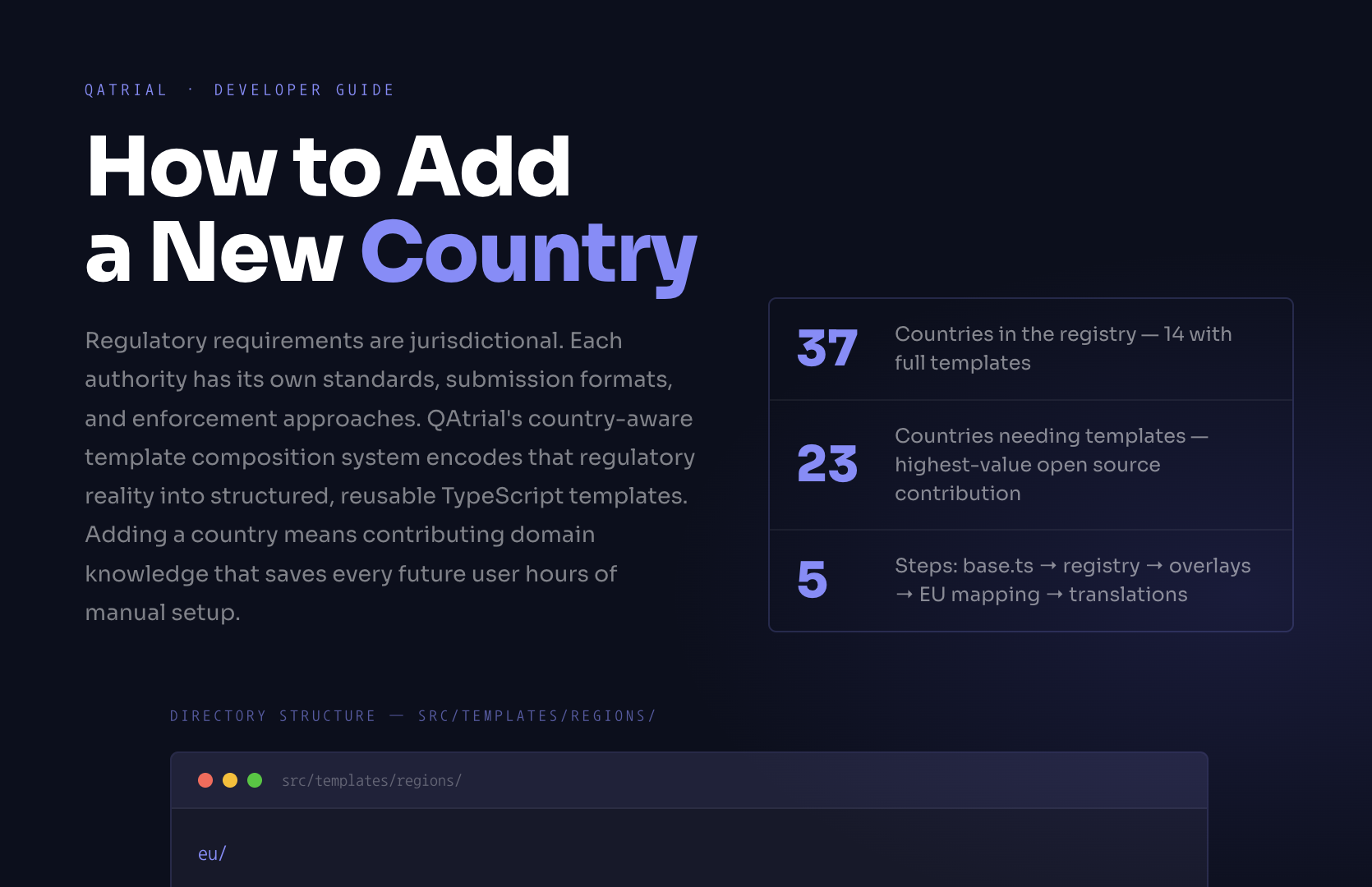
Regulatory requirements are jurisdictional. The FDA governs the United States. The EMA sets policy for the European Union. PMDA regulates Japan. Swissmedic handles Switzerland. ANVISA covers Brazil. TGA covers Australia. Each authority has its own standards, submission formats, guidances, and enforcement approaches.
a New Country
{cc}-{topic}. Prevents duplicate requirements when templates compose with EU base or vertical overlays.ch/base or ch/overlays/pharma.swissmedic not compliance.Swissmedic GMP / HMG Art. 7 — not “applicable regulations.” Vague references make templates decoration.countries.CHamericas · europe · asiade. Japan: ja. Brazil: pt.🇨🇭 (\u{'{1F1E8}'}\u{'{1F1ED}'})This means a quality management project in the US and a quality management project in Germany — even for the same product, in the same company, in the same vertical — will have different regulatory reference requirements, different template content, and different submission expectations.
QAtrial handles this through a country-aware template composition system. When a user selects a country in the setup wizard, QAtrial loads the regulatory templates specific to that jurisdiction. For EU countries, it loads the EU-wide base templates first, then applies country-specific overlays. For non-EU countries, it loads the country base directly. The result is a project pre-populated with requirements and tests that reference the correct local standards and authorities.
regulatory compliance management software
As an affiliate, we earn on qualifying purchases.
As an affiliate, we earn on qualifying purchases.
Where Country Templates Live
Country templates are TypeScript files organized in a directory structure under src/templates/regions/:
src/templates/regions/
  eu/
    base.ts            # EU-wide base templates (MDR, IVDR, EU GMP Annex 11)
  us/
    base.ts            # FDA, 21 CFR Part 11, QMSR
    overlays/
      pharma.ts        # US + Pharma specifics (FDA 21 CFR 210/211)
      medical_devices.ts  # US + Device specifics (510(k), QMSR)
  de/
    base.ts            # German-specific (BfArM, PEI)
  jp/
    base.ts            # Japan-specific (PMDA, J-GMP)
  ...
Each base.ts file exports a CountryTemplateSet containing arrays of TemplateRequirement and TemplateTest objects. Overlay files follow the VerticalTemplateSet interface and add vertical-specific regulatory content for that country.
country-specific QA trial templates
As an affiliate, we earn on qualifying purchases.
As an affiliate, we earn on qualifying purchases.
Current Countries
QAtrial’s country registry includes 37 countries available in the setup wizard. Of these, 14 countries plus the EU-wide base have full templates:
With templates: US, EU (base), DE (Germany), GB (United Kingdom), FR (France), JP (Japan), KR (South Korea), CA (Canada), MX (Mexico), CN (China), IN (India), IT (Italy), NL (Netherlands), ES (Spain)
In registry without templates (23 countries): These countries appear in the wizard and have basic metadata (name, region, flag, available verticals, default language) but do not yet have jurisdiction-specific requirement and test templates. When selected, the user gets either the EU base templates (for EU member states) or generic templates.
Adding a template for one of these 23 countries — or adding an entirely new country — is one of the most valuable contributions to QAtrial.
regulatory submission templates for pharmaceuticals
As an affiliate, we earn on qualifying purchases.
As an affiliate, we earn on qualifying purchases.
Step 1: Create the Base Template
Create a new directory and file at src/templates/regions/{cc}/base.ts, where {cc} is the lowercase ISO 3166-1 alpha-2 country code.
Real example: Adding Switzerland (CH)
Switzerland’s regulatory landscape includes Swissmedic (the national medicines and medical devices authority), the nDSG (new Federal Act on Data Protection), and FINMA (for financial sector quality requirements). Switzerland is not an EU member but has Mutual Recognition Agreements (MRAs) with the EU for medical devices and pharmaceuticals.
// src/templates/regions/ch/base.ts

import type { CountryTemplateSet } from '../../types';

export const templateSet: CountryTemplateSet = {
  countryCode: 'CH',
  requirements: [
    {
      templateId: 'ch-swissmedic-gmp-compliance',
      source: 'ch/base',
      title: 'Swissmedic GMP Compliance',
      description: 'The system shall comply with Swissmedic Good Manufacturing Practice requirements as defined in the Therapeutic Products Act (HMG) and the Medicinal Products Licensing Ordinance (AMBV). Manufacturing, testing, and release procedures shall follow current Swissmedic GMP guidance.',
      category: 'Regulatory',
      tags: ['swissmedic', 'gmp', 'hmg', 'ambv'],
      riskLevel: 'high',
      regulatoryRef: 'Swissmedic GMP / HMG Art. 7',
    },
    {
      templateId: 'ch-ndsg-data-protection',
      source: 'ch/base',
      title: 'nDSG Data Protection Compliance',
      description: 'Personal data processing shall comply with the Swiss Federal Act on Data Protection (nDSG), effective September 1, 2023. Data minimization, purpose limitation, and cross-border transfer safeguards shall be implemented for all quality records containing personal data.',
      category: 'Data Protection',
      tags: ['ndsg', 'data-protection', 'privacy', 'swiss-law'],
      riskLevel: 'medium',
      regulatoryRef: 'nDSG (Swiss FADP)',
    },
    {
      templateId: 'ch-swissmedic-csv',
      source: 'ch/base',
      title: 'Swissmedic Computer System Validation',
      description: 'Computerized systems used in GxP-regulated processes shall be validated according to Swissmedic guidance on computerized systems, consistent with EU GMP Annex 11 and GAMP 5 principles.',
      category: 'Validation',
      tags: ['swissmedic', 'csv', 'computerized-systems', 'annex-11'],
      riskLevel: 'high',
      regulatoryRef: 'Swissmedic Guidance on Computerized Systems',
    },
    // Additional requirements covering Swissmedic pharmacovigilance,
    // medical device regulation (MedDO), clinical trials (ClinO), etc.
  ],
  tests: [
    {
      templateId: 'ch-test-swissmedic-gmp-audit-trail',
      source: 'ch/base',
      title: 'Verify Swissmedic GMP Audit Trail Compliance',
      description: 'Confirm that the system maintains a complete audit trail for all GxP-relevant operations in accordance with Swissmedic GMP requirements. Verify that audit trail entries include user identification, timestamps, and change descriptions.',
      category: 'Regulatory',
      tags: ['swissmedic', 'gmp', 'audit-trail'],
      linkedReqTags: ['swissmedic', 'gmp'],
    },
    {
      templateId: 'ch-test-ndsg-data-handling',
      source: 'ch/base',
      title: 'Verify nDSG Data Handling Controls',
      description: 'Confirm that personal data in quality records is processed according to nDSG requirements, including purpose limitation, data minimization, and appropriate cross-border transfer safeguards.',
      category: 'Data Protection',
      tags: ['ndsg', 'data-protection'],
      linkedReqTags: ['ndsg', 'data-protection'],
    },
    // Additional tests
  ],
};

export default templateSet;
Key fields explained
- templateId: A stable identifier for deduplication across locales. Use the pattern
{cc}-{topic}(e.g.,ch-swissmedic-gmp-compliance). This prevents duplicate requirements when templates are composed with EU base or vertical templates. - source: Origin identifier (e.g.,
ch/baseorch/overlays/pharma). Used for debugging and template tracing. - title: A clear, specific requirement statement.
- description: Detailed specification citing the relevant law, regulation, or guidance.
- tags: Lowercase, hyphenated labels used for automatic test-to-requirement linking. Tests with
linkedReqTagsmatching these tags will be linked during project creation. - riskLevel: Set based on regulatory criticality — “critical” for patient safety and core GMP, “high” for important regulatory controls, “medium” for supporting requirements, “low” for administrative or documentation requirements.
- regulatoryRef: The specific regulatory citation (act, article, guidance document).
software for adding new country regulations
As an affiliate, we earn on qualifying purchases.
As an affiliate, we earn on qualifying purchases.
Step 2: Add to the Country Registry
In src/templates/registry.ts, add an entry to the COUNTRY_REGISTRY array:
{
  code: 'CH',
  nameKey: 'countries.CH',
  region: 'europe',
  defaultLanguage: 'de',
  flag: '\u{1F1E8}\u{1F1ED}',
  availableVerticals: [
    'pharma', 'biotech', 'medical_devices', 'software_it',
    'cosmetics', 'chemical_env'
  ],
},
Fields explained:
- code: ISO 3166-1 alpha-2 country code, uppercase.
- nameKey: The i18n translation key for the country name. Follows the pattern
countries.{CODE}. - region: Geographic grouping for the wizard UI. Options:
americas,europe,asia. - defaultLanguage: The default language code for this country’s locale.
- flag: The country’s flag emoji.
- availableVerticals: Which industry verticals are relevant in this country. Not all verticals are available in all countries — only list verticals where you can provide meaningful regulatory context.
Step 3: Add Country-Vertical Overlays
If the country has vertical-specific regulatory requirements beyond the base template, create overlay files:
src/templates/regions/ch/overlays/pharma.ts
src/templates/regions/ch/overlays/medical_devices.ts
For Switzerland, a pharma overlay might include Swissmedic-specific GMP requirements for pharmaceutical manufacturing, referencing the AMBV (Medicinal Products Licensing Ordinance) and Swissmedic-specific inspection expectations.
A medical devices overlay might reference the Medical Devices Ordinance (MedDO) and Switzerland’s MRA with the EU for medical device conformity assessment.
Each overlay follows the VerticalTemplateSet interface and exports requirements and tests specific to that country-vertical combination.
Overlays are optional. If a country’s base template is sufficient for all verticals, no overlays are needed. Overlays add specificity — they are most valuable when the country has vertical-specific regulations that differ from the generic country-level requirements.
Step 4: Handle EU/EFTA Mapping
If the country uses EU base regulations — either as an EU member state or through agreements like Switzerland’s MRA — the template composer can automatically load regions/eu/base.ts first, then apply the country-specific base and overlays on top.
For EU member states, add the country code to the euCountries array in src/templates/composer.ts:
const euCountries = [
  'DE', 'FR', 'IT', 'ES', 'NL', 'BE', 'AT', 'SE', 'DK', 'IE',
  'PL', 'PT', 'CZ', 'FI', 'NO', 'CH',  // Add here
];
For Switzerland specifically, this is appropriate because Swissmedic accepts EU GMP certificates and Switzerland’s MRA with the EU covers pharmaceutical and medical device regulation. The EU base templates (EU MDR 2017/745, EU GMP Annex 11, EU IVDR) provide a relevant foundation that the Swiss overlays then refine.
For countries outside the EU that do not share EU base regulations (e.g., US, Japan, Korea), do not add them to this array. Their base templates should be self-contained.
Step 5: Add Translation Keys
In every locale file under public/locales/{lang}/common.json, add the country name translation:
{
  "countries": {
    "CH": "Switzerland"
  }
}
For the German locale (public/locales/de/common.json):
{
  "countries": {
    "CH": "Schweiz"
  }
}
QAtrial supports 12 fully translated languages (en, de, fr, es, it, pt, nl, ja, zh, ko, hi, th) plus 23 additional locale directories. At minimum, add the translation to the English locale. Adding translations to other locales is a bonus but not required — the English fallback will be used if a translation is missing.
Template Quality Guidelines
Writing useful templates requires domain knowledge. Here are guidelines for quality:
Cite real regulatory references. Do not write “shall comply with applicable regulations.” Write “shall comply with Swissmedic GMP requirements as defined in the Therapeutic Products Act (HMG) Art. 7.” Specific references make the template useful; vague references make it decoration.
Set appropriate risk levels. Patient safety and core GMP requirements should be “critical” or “high.” Supporting documentation requirements should be “medium.” Administrative requirements should be “low.” When in doubt, err on the side of higher risk — it is easier to downgrade risk than to explain to an auditor why a critical requirement was marked “low.”
Use meaningful tags for linking. Tags like “swissmedic” and “gmp” are useful because tests can use linkedReqTags: ['swissmedic', 'gmp'] to automatically link. Tags like “important” or “compliance” are too generic to create meaningful linkages.
Write testable requirements. A requirement should describe something that can be verified. “The system shall comply with GMP” is not testable. “The system shall maintain an audit trail that records the user identity, timestamp, and description of each GMP-relevant change” is testable.
Write tests with clear pass criteria. Each test description should describe what to check and what constitutes a pass. “Verify GMP compliance” is vague. “Confirm that audit trail entries include user ID, ISO 8601 timestamp, and change description for all CRUD operations on batch records” is clear.
Testing Your New Country
After creating the template files and updating the registry:
- Run
npm run devto start the development server - Click “New Project” (or clear existing data)
- In the setup wizard Step 1, search for your new country
- Verify the country appears with the correct flag, name, and region
- Select it and proceed to Step 2 — verify that the
availableVerticalsyou specified appear - Continue through the wizard and reach Step 6 (Preview)
- Verify that your template requirements and tests appear in the preview list
- Check that regulatory references, risk levels, and tags are correct
- Create the project and verify requirements and tests are created with proper metadata
If the country is mapped as an EU/EFTA country, also verify that EU base templates load alongside your country-specific templates.
Final Takeaway
Adding a country to QAtrial means encoding that jurisdiction’s regulatory reality into structured, reusable templates. The process is straightforward: create a base.ts with requirements and tests, register the country in the registry, optionally add vertical overlays and EU mapping, and wire translations. The template composition system handles the rest — your country templates automatically work with all verticals, modules, and project types.
The quality of a country template depends on domain knowledge. If you know the regulatory landscape of a jurisdiction — the authorities, the key regulations, the submission requirements — you can create a template that saves every future user of QAtrial in that jurisdiction hours of manual setup.
Related Topics
- How to Add a New Vertical — How to create industry vertical templates that compose with country templates
- How to Contribute to QAtrial — Overview of all contribution types and local development setup
- What Is QAtrial — Overview of the platform’s country-aware, vertical-aware architecture
QAtrial is developed privately and is not publicly available.
Fall Picks
fall essentials
As an affiliate, we earn on qualifying purchases.