Separation of duties is not a best practice in regulated industries. It is a regulatory requirement. 21 CFR Part 11 section 11.10(d) mandates “limiting system access to authorized individuals.” EU Annex 11 section 12 requires that access controls be defined based on job function. ISO 13485 clause 6.2 expects competence and role assignments to be documented. GAMP 5 explicitly addresses role-based access as part of system security controls.

Get monitors, keyboards and dev gear delivered free — and shop member deals
- Fast, free delivery on millions of items
- Access to Prime Big Deal Days deals on October 6–7
- Prime Video, Amazon Music and more included
Access Control
in Regulated QMS
| Permission | Admin | QA Manager | QA Engineer | Auditor | Reviewer |
|---|---|---|---|---|---|
|
canView
requirePermission(‘canView’)
|
✓ | ✓ | ✓ | ✓ | ✓ |
|
canEdit
All mutation endpoints
|
✓ | ✓ | ✓ | — | — |
|
canApprove
Approval + signature endpoints
|
✓ | ✓ | — | — | ✓ |
|
canAdmin
User mgmt · SSO · webhooks
|
✓ | — | — | — | — |
Despite this, many quality management implementations treat access control as an afterthought — a binary distinction between “admin” and “everyone else.” QAtrial v3.0.0 implements a five-role RBAC system that maps directly to the roles found in real regulated quality organizations, with permission enforcement at every API endpoint.
The Five Roles
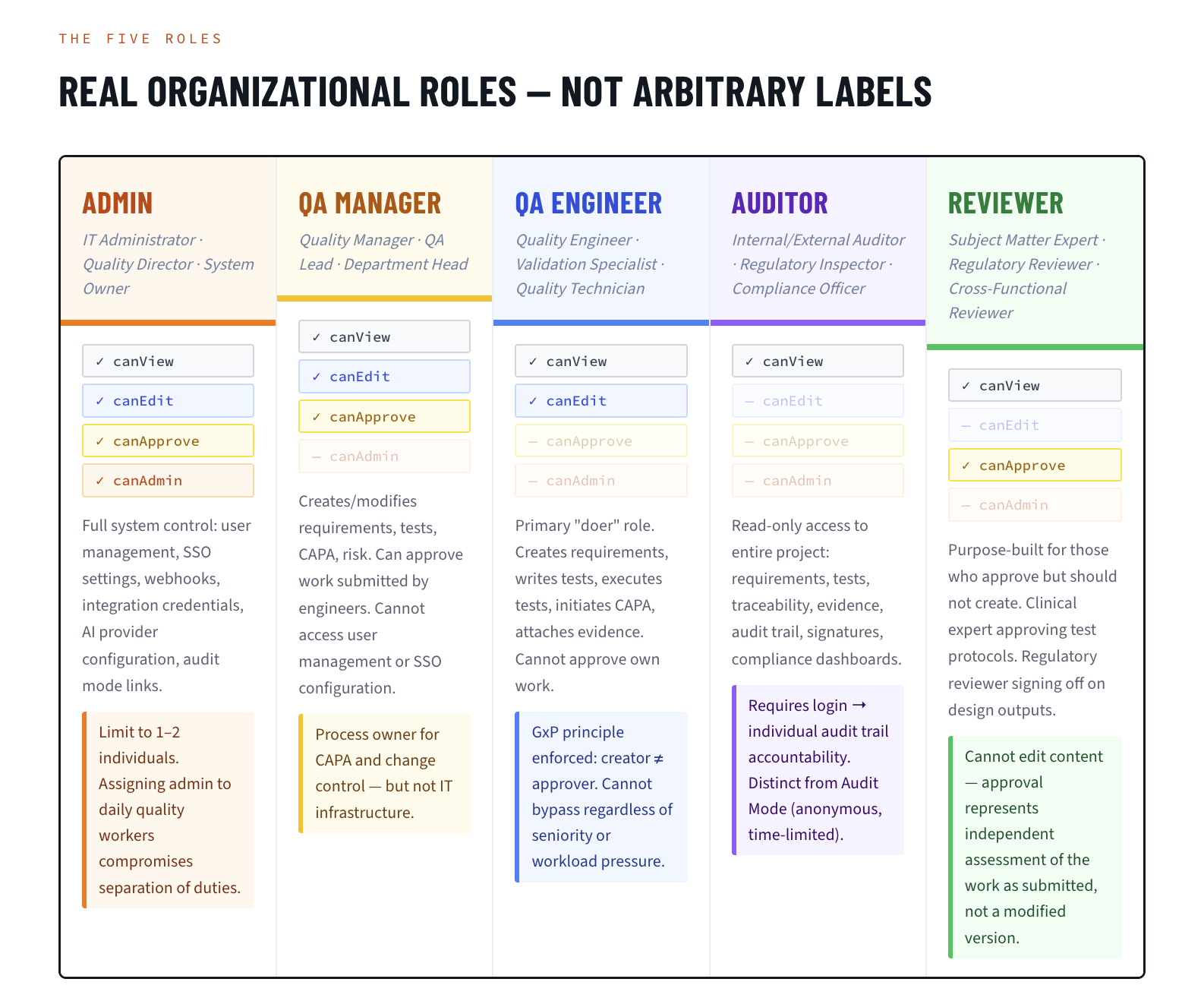
QAtrial defines five roles, each with a distinct permission set. These roles are not arbitrary labels; they reflect the organizational roles that regulatory frameworks expect to see separated.
Admin
Real-world mapping: IT Administrator, Quality Director, System Owner
Permissions: View, Edit, Approve, Admin
The admin role has full system control. This includes user management (creating accounts, assigning roles, deactivating users), system configuration (SSO settings, webhook management, integration credentials, AI provider configuration), and audit mode link generation.
In a typical deployment, admin access is limited to one or two individuals: the IT administrator who maintains the system and the Quality Director who owns the quality management system. This role should not be assigned to personnel who perform day-to-day quality work, as it would compromise separation of duties.
QA Manager
Real-world mapping: Quality Manager, Quality Assurance Lead, Department Head
Permissions: View, Edit, Approve (no Admin)
The QA Manager can create and modify requirements, test cases, CAPA records, and risk assessments. Critically, this role can also approve — meaning QA Managers can review and approve work submitted by QA Engineers. They cannot, however, access system administration functions: user management, SSO configuration, and webhook settings are outside their scope.
This maps to the common organizational pattern where the Quality Manager directs quality activities, reviews and approves quality documents, and serves as the process owner for CAPA and change control — but does not manage IT infrastructure.
QA Engineer
Real-world mapping: Quality Engineer, Quality Analyst, Validation Specialist, Quality Technician
Permissions: View, Edit (no Approve, no Admin)
The QA Engineer is the primary “doer” role. They create requirements, write test cases, execute tests, initiate CAPA records, attach evidence, and document deviations. They cannot approve their own work. This enforces the fundamental GxP principle that the person who creates a record should not be the same person who approves it.
In practice, a QA Engineer creates a requirement, links test cases, executes those tests, and then submits the work for approval. A QA Manager or Reviewer must approve. The QA Engineer cannot bypass this step, regardless of seniority or workload pressure.
Auditor
Real-world mapping: Internal Auditor, External Auditor, Regulatory Inspector, Compliance Officer
Permissions: View only (no Edit, no Approve, no Admin)
The auditor role provides read-only access to the entire project: requirements, tests, traceability matrix, evidence, audit trail, electronic signatures, and compliance dashboards. Auditors cannot modify any record, approve any document, or change any configuration.
This role serves two purposes. First, it provides a secure way to give internal auditors permanent read-only access to the quality system. Second, it can be used as an alternative to Audit Mode links when the auditor needs ongoing access rather than a time-limited view.
The distinction between the auditor role and Audit Mode is important: the auditor role requires a user account and login, providing individual accountability in the audit trail. Audit Mode links are anonymous and time-limited, designed for external auditors who should not have permanent accounts.
Reviewer
Real-world mapping: Designated Reviewer, Subject Matter Expert, Regulatory Reviewer, Cross-Functional Reviewer
Permissions: View, Approve (no Edit, no Admin)
The reviewer role is purpose-built for individuals who need to approve work but should not create or modify it. A regulatory affairs specialist who reviews requirements for regulatory accuracy but does not write them. A clinical expert who approves test protocols but does not execute them. A cross-functional reviewer from manufacturing who signs off on design outputs.
The reviewer can view all records and approve (or reject) items submitted for approval. They cannot edit content, ensuring that the approval represents an independent assessment of the work as submitted, not a modified version.
role-based access control software
As an affiliate, we earn on qualifying purchases.
As an affiliate, we earn on qualifying purchases.
The Permission Matrix
| Permission | admin | qa_manager | qa_engineer | auditor | reviewer |
|---|---|---|---|---|---|
| canView | Yes | Yes | Yes | Yes | Yes |
| canEdit | Yes | Yes | Yes | No | No |
| canApprove | Yes | Yes | No | No | Yes |
| canAdmin | Yes | No | No | No | No |
Four permissions, five roles, sixteen cells. This matrix is simple enough to explain in a training session and comprehensive enough to satisfy regulatory expectations for separation of duties.
regulated industry access management tools
As an affiliate, we earn on qualifying purchases.
As an affiliate, we earn on qualifying purchases.
How Permission Enforcement Works
QAtrial enforces permissions through a requirePermission() middleware function that executes on every API request. This is not a frontend-only check that could be bypassed by calling the API directly. The enforcement happens at the server level, before any database operation occurs.
When a user attempts to edit a requirement:
- The request hits the
PUT /api/requirements/:idendpoint. - The JWT token in the request header is validated and decoded.
- The user’s role is extracted from the token.
requirePermission('canEdit')checks whether the role has edit permission.- If the role does not have edit permission (auditor, reviewer), the request is rejected with a 403 Forbidden response.
- If the role has permission, the request proceeds to the route handler.
This check occurs on every mutation endpoint. There is no way to modify data in QAtrial without passing through the permission middleware. The same pattern applies to approval endpoints (checked against canApprove) and administration endpoints (checked against canAdmin).
ISO 13485 compliance access control
As an affiliate, we earn on qualifying purchases.
As an affiliate, we earn on qualifying purchases.
Regulatory Mapping
21 CFR Part 11
- Section 11.10(d): “Limiting system access to authorized individuals.” QAtrial’s five-role RBAC with endpoint-level enforcement directly implements this requirement. Each role has explicitly defined permissions. Access beyond the role’s scope is denied at the API level.
- Section 11.10(g): “Use of authority checks to ensure that only authorized individuals can use the system, electronically sign a record, access the operation or computer system input or output device, alter a record, or perform the operation at hand.” The
requirePermission()middleware is the authority check. Electronic signatures require thecanApprovepermission, ensuring only authorized roles can sign.
EU Annex 11
- Section 2 (Personnel): “Key roles should be identified and relevant responsibilities should be placed on named individuals.” QAtrial’s role assignment creates a documented link between each user account and their organizational function.
- Section 12 (Security): “Physical and/or logical controls should be in place to restrict access to computerised systems to authorised persons.” JWT authentication provides logical access control. RBAC restricts what authorized persons can do within the system.
ISO 13485
- Clause 4.1.5: “The organization shall document procedures for the validation of the application of computer software used in the quality management system.” RBAC is part of the system’s operational procedures, documented in this article and in QAtrial’s User Guide.
- Clause 6.2: “Personnel performing work affecting product quality shall be competent on the basis of appropriate education, training, skills and experience.” Role assignment in QAtrial creates a documented record of the level of access granted, which can be mapped to training records.
As an affiliate, we earn on qualifying purchases.
Audit Trail Integration
Every action in QAtrial is recorded in the append-only audit trail with the user’s identity and role. This means the audit trail does not just show what happened — it shows who did it and what authority they had when they did it.
Example audit trail entries:
- “qa_engineer@company.com (qa_engineer) created requirement REQ-042 at 2026-03-15T14:22:31Z”
- “qa_manager@company.com (qa_manager) approved requirement REQ-042 at 2026-03-15T16:45:12Z”
- “reviewer@company.com (reviewer) rejected test TST-108 at 2026-03-16T09:11:03Z with reason: ‘Acceptance criteria insufficient for safety-critical function'”
When an auditor reviews the audit trail, they can verify that:
- Requirements were created by personnel with edit permissions.
- Approvals were granted by personnel with approve permissions.
- The same individual did not both create and approve a record.
- Administrative changes were made by personnel with admin permissions.
This level of accountability is what 21 CFR Part 11 section 11.10(e) means by “secure, computer-generated, time-stamped audit trails.”
SSO Integration: Role Mapping from Identity Providers
For organizations using single sign-on, QAtrial’s OIDC integration supports role assignment during user provisioning. When a user authenticates via SSO for the first time, QAtrial creates their account with a configurable default role (set via the SSO_DEFAULT_ROLE environment variable).
Common configurations:
- Default to qa_engineer: New SSO users get standard edit permissions. Administrators promote users to qa_manager or reviewer as needed.
- Default to auditor: In environments where most SSO users need read-only access, default to the most restrictive role and upgrade individually.
Role changes after provisioning are performed by administrators within QAtrial’s user management interface. The role change is logged to the audit trail, creating a documented record of when the user’s permissions changed and who authorized the change.
For organizations with IdP-managed group memberships (e.g., Okta groups, Azure AD groups), the role mapping can be extended through the SSO callback handler to automatically assign QAtrial roles based on IdP attributes. This ensures that role assignments in QAtrial mirror the organization’s access governance model.
Practical Deployment Guidance
Start with the principle of least privilege. Assign the most restrictive role that allows each user to perform their job function. Promote as needed rather than demoting after a problem.
Document role assignments. QAtrial’s user management interface shows each user’s role. Export this list and include it in the quality system’s access control documentation.
Review periodically. User roles should be reviewed at least annually (more frequently in high-risk environments). Deactivate accounts for personnel who have left the organization or changed roles.
Test the boundaries. During OQ execution, step OQ-18 specifically tests RBAC enforcement by verifying that a non-admin user cannot access admin functions and that a qa_engineer cannot approve records. Execute this test to confirm that permission enforcement is working in your deployment.
Separate admin from daily use. The person who administers the system should not use the admin account for daily quality work. If the Quality Director also performs quality engineering tasks, they should have two accounts: one admin account for system administration and one qa_manager or qa_engineer account for daily work. This maintains separation of duties in the audit trail.
Conclusion
Role-based access control is not a feature to check off a compliance list. It is the mechanism that makes separation of duties enforceable, audit trails meaningful, and electronic signatures trustworthy. QAtrial’s five-role system — admin, qa_manager, qa_engineer, auditor, reviewer — maps directly to the organizational roles that regulated companies already have. The requirePermission() middleware ensures that these roles are enforced at the API level, not just in the user interface.
QAtrial v3.0.0 is developed privately and is not publicly available.
Fall Picks
fall essentials
As an affiliate, we earn on qualifying purchases.