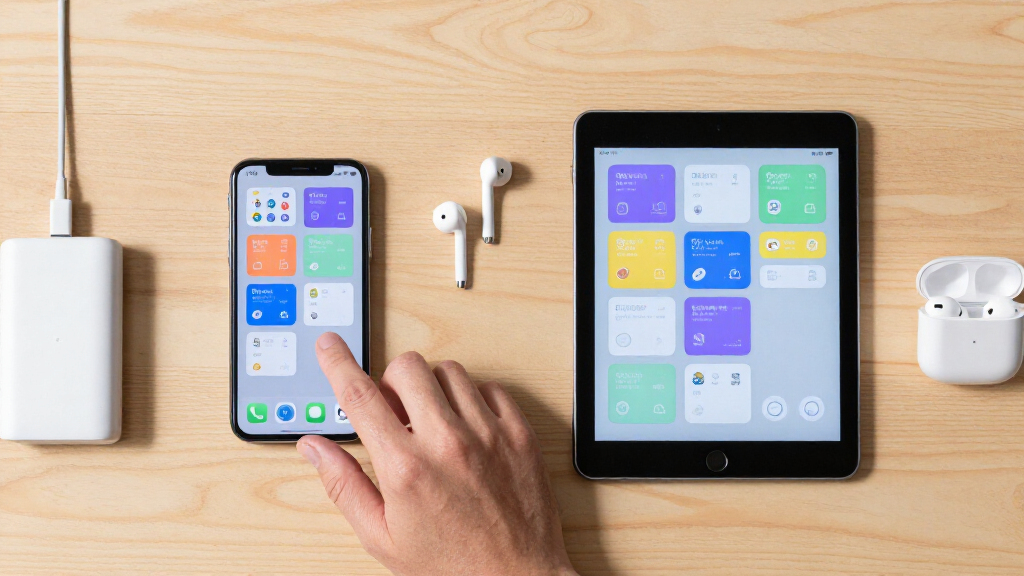
This checklist is for QA teams, developers, and independent testers preparing a practical device setup for mobile app testing. It covers hardware for checking Android and iPhone behavior, keeping devices powered, positioning screens, testing connectivity, and maintaining clean displays.

Get business pricing on monitors, keyboards and dev gear
- Business-only prices and quantity discounts
- Tax-exempt purchasing
- Multiple users, one account, clear invoices
The sections follow the main pieces of a test setup: phones first, then charging and positioning, network access, and screen care. Some slots offer selection guidance instead of a named product because no specific pick was provided.
Use the advice to match each item to your device mix, test cases, and workspace. Check connector and device compatibility against the manufacturers’ specifications, and treat the named products as starting points for your own requirements review.
Android Test Phone
An Android test phone helps you check how an app behaves on the platform your users may carry every day. The right choice depends on the devices and Android versions your test plan needs to cover. Start by listing the OS versions, screen sizes, hardware features, and connection types that matter to your app rather than choosing a phone by brand alone.
A common mistake is relying on one device and treating its behavior as representative of every Android setup. If your testing scope calls for broader coverage, plan a device mix that reflects the cases you need to exercise. Confirm that each candidate can run the required OS version and app build, and check physical dimensions and ports against any accessories or fixtures in your lab. Keep the intended test scenarios in view: a device selected for a specific compatibility case may not suit a different one. Match the phone to the coverage plan before expanding your device list.
What to look for:
- Android versions your test plan must cover
- Screen sizes and resolutions relevant to the app
- Hardware features needed for target test cases
- Ports and wireless capabilities compatible with lab accessories
- A device mix that addresses your intended coverage
iPhone Test Device
An iPhone test device gives you a way to evaluate your app on Apple hardware and the iOS version in scope. Begin with the iOS versions and device models your test plan requires, then confirm that a candidate can install and run the builds you need. The best fit is the one that helps answer your specific compatibility questions.
A frequent buying mistake is assuming that one iPhone covers every display size or OS scenario in a test matrix. Decide whether you need coverage across multiple models or versions, and prioritize accordingly. Check the device’s connector and physical size if you will use docks, stands, or shared charging equipment; verify compatibility with those accessories before purchasing. Keep lab workflows in mind too: a phone that can be reliably reset, updated, and assigned to a test case is easier to use consistently. Let the test matrix set the scope, and avoid adding devices that do not address a defined testing need.
What to look for:
- iOS versions required for your app and test plan
- Models or screen sizes needed for compatibility coverage
- Ability to install the app builds under test
- Connector and dimensions compatible with lab accessories
- A manageable update and reset workflow for shared testing
USB-C Charging Hub
A charging hub can make a device-testing workspace easier to organize when several USB-C devices need power. The listed pick is the 1200W USB-C Charger Block with 12 Ports, Fast Charging Station for Mac. Before choosing it, check the manufacturer’s specifications for supported charging standards, per-port output, and how total output is shared across connected devices.
A common mistake is interpreting a large total-output figure as a guarantee that every port can provide the same power at once. Review the port-by-port power details and confirm that the hub’s USB-C connections suit the phones and accessories you plan to charge. Also check plug type, cable needs, physical footprint, and placement in your workspace. If your test devices use different connectors, verify whether you need separate cables or another charging option. A tidy setup still needs clear labeling so devices can be identified while charging, especially when multiple builds or test cases are in progress.
What to look for:
- Per-port output and total power-sharing details
- Charging standards supported by each USB-C port
- Compatibility with your phones and other devices
- Included cables, plug type, and cable reach
- Size and placement suited to the testing workspace
1200W USB-C Charger Block with 12 Ports, Fast Charging Station for MacBook, iPho

This 1200W charging station features 12 ports, including 8 USB-C and 4 USB-A, providing fast and simultaneous charging for multiple devices such as smartphones, tablets, and laptops. Compatible with a wide range of devices including MacBook, iPhone 17, Samsung Galaxy, iPad, and more, it offers extended power and safety features for versatile use at home or on the go.
Pros:
- High power output with 12 ports for multiple devices
- Fast charging speeds compatible with a wide range of devices
- Includes safety technology for secure charging
Cons:
- Large and heavy, may not be portable for all users
- Complex setup with many ports and specifications
- Price not specified
Best for: Labs that need a multi-port USB-C charging station
Not ideal for: Setups that have not confirmed device charging requirements
Bottom line: Verify per-port output and compatibility for the 1200W USB-C Charger Block before using it with test devices.
Device Testing Stand
A device stand can keep a phone positioned consistently while you observe a test, record a screen, or use the device alongside a computer. Since this slot has no named product pick, choose a stand based on how your team actually handles devices. Consider whether it needs to hold one phone at a time or support repeated adjustments during a testing session.
A common mistake is choosing a stand that fits a phone’s dimensions but blocks a button, port, camera, or cable connection needed for the test. Check the phone’s size with its case on, if cases are part of your workflow, and make sure the support points do not interfere with the areas you need to access. If the device must remain charging, verify that the stand leaves its connector reachable and accommodates the cable route. For repeatable visual checks, prioritize stable, adjustable positioning and an unobstructed screen. Confirm fit with each device you intend to use rather than assuming one stand works across the whole lab.
What to look for:
- Compatibility with phone dimensions and cases
- Stable support at the angles used in testing
- Clear access to buttons, ports, and cameras
- Room for charging cables if needed
- Adjustability suited to observation or recording
Portable Wi-Fi Router
A portable router can support testing in locations where you need a network setup that travels with the team. The named pick is the GL.iNet GL-E5800 NA MUDI 7 5G Tri-Band Wi-Fi 7 Travel Router with eSIM. Review the manufacturer’s specifications for supported cellular bands, Wi-Fi features, eSIM service requirements, and regional compatibility before relying on it for a test environment.
A common mistake is assuming that a router’s listed connectivity features guarantee service with a particular carrier, plan, or location. Check those requirements, and confirm how the device handles the network conditions your tests need to simulate. Decide whether your setup needs a private local network, mobile connectivity, or both, and verify that the router supports the planned workflow. For app testing, keep in mind that a single network configuration may not represent every user condition. Plan the scenarios first, then confirm that the router and its service arrangements can support them. Verify power and cable requirements for travel as well.
What to look for:
- Cellular bands and regional compatibility
- eSIM activation and service requirements
- Wi-Fi capabilities needed for planned scenarios
- Support for the network setup your tests require
- Power, cable, and travel-use requirements
GL.iNet GL-E5800 NA MUDI 7 5G Tri-Band Wi-Fi 7 Travel Router with eSIM

The GL.iNet GL-E5800 MUDI 7 is a high-performance travel router supporting 5G and Wi-Fi 7, with dual SIM options and a touchscreen interface. It offers multiple wired and wireless connections, advanced VPN features, and a long-lasting battery, making it ideal for on-the-go connectivity and professional use.
Pros:
- Supports ultra-fast 5G and Wi-Fi 7 for high-speed connectivity
- Flexible SIM options with eSIM and dual nano-SIM support
- Multiple wired and wireless connections with failover capabilities
- Long battery life with fast charging
Cons:
- Complex setup may be challenging for non-technical users
- Premium features might be overkill for casual users
- Large size could be less portable for some travelers
Best for: Teams that need portable connectivity for testing
Not ideal for: Testing plans without confirmed carrier or regional requirements
Bottom line: Check network compatibility and eSIM service requirements for the GL.iNet GL-E5800 before building it into your test setup.
Screen Cleaning Kit
A screen-cleaning kit helps keep test devices readable during repeated hands-on use. The listed pick is the Electronics Cleaner Kit with Keyboard Brush, Screen Wiper, and Earphon. Its name identifies a brush and screen wiper, but verify the complete contents and manufacturer’s instructions before using it on your devices.
A common mistake is using a cleaning liquid, cloth, or tool without confirming that it is suitable for the device’s screen coating and materials. Read the product and device guidance, and follow any instructions about application and drying. Check whether the kit includes the items your workflow needs, and whether the brush or wiper can reach the areas you want to clean without scratching them. Store the kit where testers can find it, and use device-appropriate cleaning methods between handling sessions. If you test devices with cases or accessories, confirm those materials can also be cleaned using the selected method.
What to look for:
- Complete kit contents and included cleaning materials
- Instructions for screens and device surfaces
- Compatibility with the screen coatings on your devices
- Tools that can reach the areas you need to clean
- Storage and handling suited to a shared testing space
Electronics Cleaner Kit with Keyboard Brush, Screen Wiper, and Earphone Cleaning
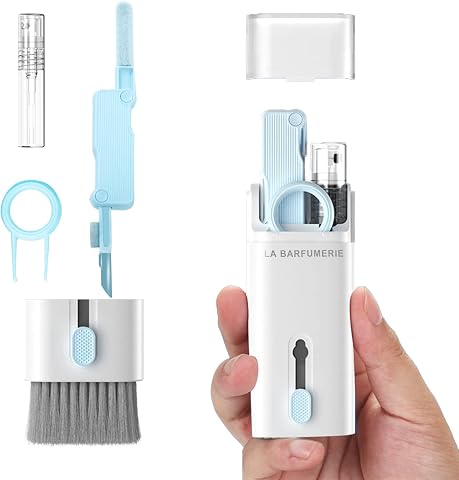
This multifunctional desktop cleaner kit includes a keyboard brush, screen cleaning wiper, headphone cleaning tool, spray bottle, and key puller. It effectively cleans dust, fingerprints, smudges, and earwax from various electronic devices such as laptops, smartphones, and headphones, helping to maintain device performance and appearance.
Pros:
- All-in-one cleaning solution for multiple devices
- Effective at removing dust, fingerprints, and earwax
- Includes specialized tools like a key puller and spray bottle
Cons:
- May require careful handling to avoid damage to delicate screens
- Limited information on durability of cleaning tools
- No specific size or dimensions provided
Best for: Shared labs that clean screens between testing sessions
Not ideal for: Users who have not checked surface compatibility or instructions
Bottom line: Confirm the kit’s contents and follow device guidance before using the Electronics Cleaner Kit on test screens.
Build the setup in a budget-first order by covering the devices and test cases your app requires, then adding shared charging and positioning equipment. Add portable networking if your scenarios call for it, and screen care to support routine use. Prioritize coverage before convenience, and verify compatibility before buying accessories.
You do not need to solve every testing need in one purchase. Start with a clear device matrix, document what each item supports, and expand as your test coverage grows. A deliberate setup makes it easier to see which device or condition a result applies to, and gives your team a practical foundation for the next round of testing.