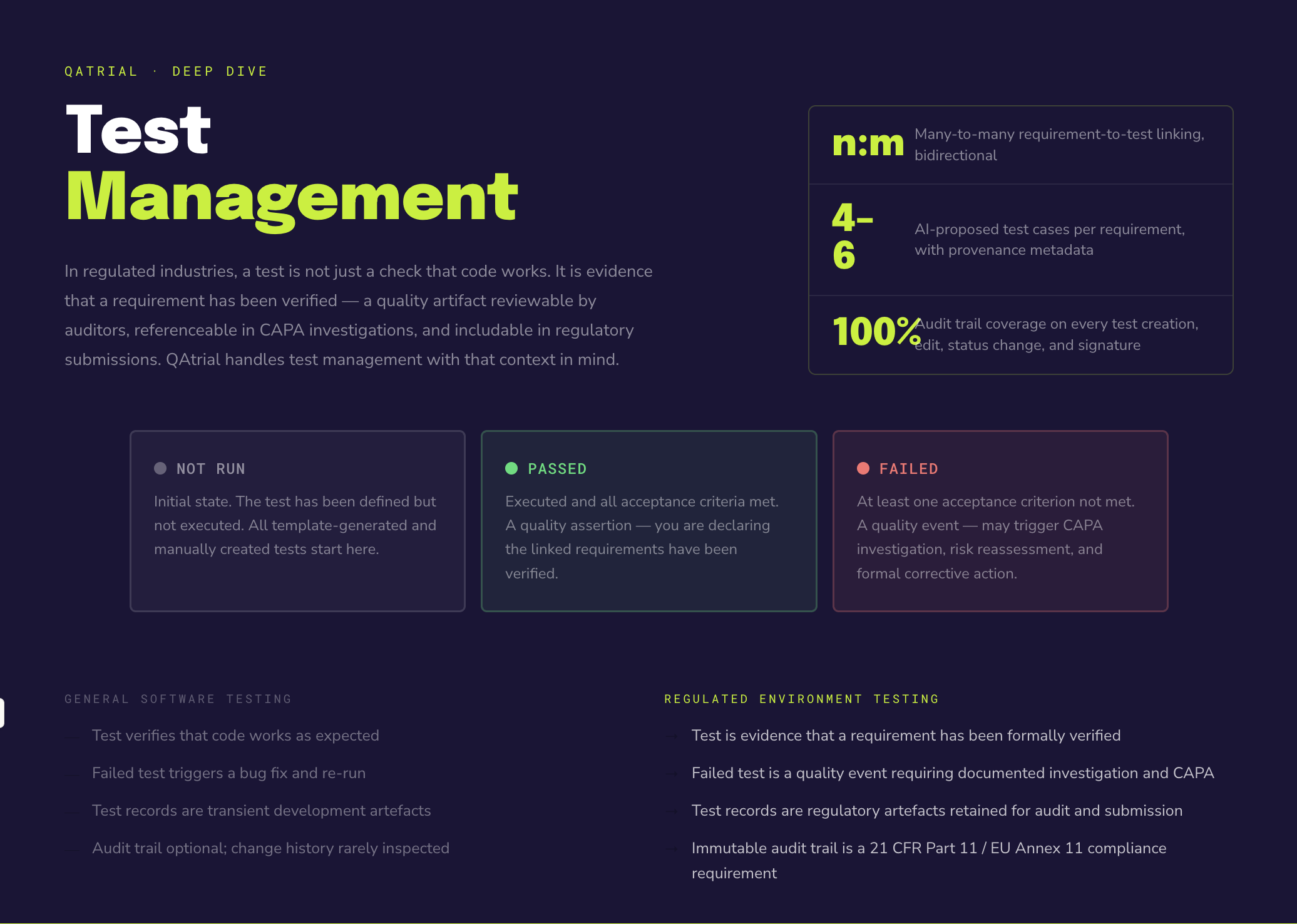
Test management in a regulated environment is different from test management in general software development. In regulated industries, a test is not just a check that code works. It is evidence that a requirement has been verified. The test record itself is a quality artifact that may be reviewed by auditors, included in regulatory submissions, and referenced in CAPA investigations.

Get business pricing on monitors, keyboards and dev gear
- Business-only prices and quantity discounts
- Tax-exempt purchasing
- Multiple users, one account, clear invoices
QAtrial handles test management with this context in mind: structured linking to requirements, formal status tracking, audit trail coverage, AI-assisted test generation, and integration with CAPA workflows when tests fail.
Management
from test side
linkedReqTags that match against requirement tags during wizard composition. After creation, links are stored as explicit IDs — not tags.Creating a Test
Navigate to the Tests tab and click the Test button in the top-right corner. A modal opens with four sections:
Title (required): A descriptive test case title that makes the test’s purpose clear. “Verify that login fails after three incorrect password attempts and locks the account for 15 minutes” is more useful in an audit context than “Login lock test.”
Description (required): The test procedure, steps, expected outcomes, and acceptance criteria. In regulated environments, this description serves as the test protocol. It should be detailed enough that someone unfamiliar with the system could execute the test and determine whether it passed or failed.
Status: Not Run (default), Passed, or Failed.
Linked Requirements: A list of all available requirements displayed as checkboxes. Select one or more requirements that this test verifies.
Click Save. The test is assigned an auto-generated ID: TST-001, TST-002, TST-003.
regulated industry test management software
As an affiliate, we earn on qualifying purchases.
As an affiliate, we earn on qualifying purchases.
The Linking Model
Tests and requirements have a many-to-many (n:m) relationship:
- A single test can verify multiple requirements. For example, a comprehensive integration test might verify both a data integrity requirement and an audit trail requirement simultaneously.
- A single requirement can be verified by multiple tests. For example, a complex password policy requirement might need separate tests for minimum length, character composition, history enforcement, and expiration.
Links are managed from the test side. When you create or edit a test, you select which requirements it covers. This is an intentional design choice: the test declares what it verifies.
Automatic linking during setup. When the setup wizard composes templates, tests are linked to requirements through tag-based matching. Each template test has linkedReqTags (e.g., [“audit-trail”, “data-integrity”]), and each template requirement has tags. The system matches these during composition and converts tag matches into direct ID-based links. After project creation, the links are stored as explicit requirement IDs, not tags.
audit trail documentation tools for QA
As an affiliate, we earn on qualifying purchases.
As an affiliate, we earn on qualifying purchases.
Status Tracking
Tests follow a three-state lifecycle:
Not Run  -->  Passed
         \--> Failed
Not Run is the initial state. The test has been defined but not yet executed. This is the starting state for all tests, whether created manually or generated by templates.
Passed means the test was executed and all acceptance criteria were met. Setting a test to Passed is a quality assertion: you are declaring that the linked requirements have been verified by this test.
Failed means the test was executed and at least one acceptance criterion was not met. A failed test is not just a status. In a regulated context, it is a quality event that may trigger investigation, CAPA, or risk reassessment.
Status changes are recorded in the audit trail with the user who made the change, the timestamp, and the previous status.
AI-assisted test case generation software
As an affiliate, we earn on qualifying purchases.
As an affiliate, we earn on qualifying purchases.
The Tests Table
The tests table displays all tests in the project with sortable columns:
- ID: The auto-generated test identifier (TST-001, etc.)
- Title: The test case title
- Status: Not Run, Passed, or Failed, displayed as a color-coded badge
- Linked Requirements: Shows the IDs of linked requirements in a compact format
The table supports:
- Text search: Filter tests by title or description
- Column sorting: Click any column header to sort
- Pagination: Automatic for large test sets
test management tools with CAPA integration
As an affiliate, we earn on qualifying purchases.
As an affiliate, we earn on qualifying purchases.
How Test Counts Appear on Requirements
In the requirements table, each requirement row shows how many tests are linked to it. This count is a quick indicator of test coverage. A requirement with zero linked tests is a coverage gap. A requirement with five linked tests has strong coverage (though coverage alone does not guarantee quality — the tests need to pass).
The Overview dashboard computes a coverage percentage: the number of requirements with at least one linked test, divided by the total number of requirements. This is one of the five metrics in the compliance readiness score.
Orphaned Test Detection
The Overview dashboard identifies two categories of orphaned items:
Orphaned requirements: Requirements with no linked tests. These represent coverage gaps where a requirement exists but no test verifies it.
Orphaned tests: Tests that are not linked to any requirement. These represent potential waste: tests that exist but do not contribute to requirement verification. They may also indicate tests that were created independently and should be linked to requirements.
Orphaned items are not errors. During early project phases, it is normal to have many orphaned requirements (tests have not been written yet) or orphaned tests (imports from legacy systems). The dashboard makes these visible so you can address them systematically.
AI Test Generation from Requirements
When an AI provider is configured, each requirement row has a test generation button. Clicking it opens the AI Test Generation Panel, which:
- Reads the requirement’s title, description, risk level, and regulatory reference
- Includes project context: country, vertical, applicable standards
- Sends a structured prompt to the configured LLM
- Returns four to six proposed test cases
Each proposed test includes:
- A title describing what is being tested
- A description with test steps and expected outcomes
- A pre-set link to the originating requirement
The proposals appear in a review panel. You can:
- Accept a test as-is, which creates it in the system with a proper ID and link
- Edit a test before accepting, modifying the title or description
- Reject a test you do not need
This workflow embodies the human-in-the-loop principle: the AI handles the labor-intensive part (thinking through test scenarios), while the human retains decision authority.
The quality of generated tests depends on the quality of the requirement. A vague requirement produces vague tests. A specific, testable requirement with clear acceptance criteria produces specific, actionable tests. This creates a positive feedback loop: writing better requirements improves AI output, which improves test coverage.
Confidence Scoring and Provenance
AI-generated tests include provenance metadata: which model generated them, what parameters were used, how many tokens were consumed, and a timestamp. If the same requirement is sent through test generation multiple times, a re-run history tracks all versions, allowing comparison.
This provenance tracking matters in regulated contexts. If an auditor asks “how was this test case developed?”, the provenance record provides a clear answer: it was generated by a specific model, reviewed by a specific person, and accepted on a specific date.
CAPA Suggestions When Tests Fail
When a test is marked as Failed, the CAPA dashboard flags it for corrective action. If an AI provider is configured, the system can generate CAPA suggestions:
- Root cause analysis: The AI examines the failed test in context (what requirement it verifies, what the acceptance criteria were, what the project’s regulatory context is) and proposes potential root causes.
- Corrective actions: Proposed actions to address the failure.
- Preventive actions: Proposed actions to prevent recurrence.
These suggestions are proposals, not decisions. A QA engineer or quality manager reviews the suggestions, modifies them as needed, and creates a formal CAPA record if warranted.
The CAPA record then enters its own lifecycle (open, investigation, in_progress, verification, resolved, closed), with evidence attachment and audit trail coverage. The connection between the failed test and the CAPA record is maintained as traceability data.
Editing and Deleting Tests
Editing: Click the pencil icon on any test row. The edit modal opens with all fields pre-filled. Modify the title, description, status, or linked requirements and save. The edit is recorded in the audit trail.
Deleting: Click the trash icon. A confirmation dialog appears. Deleting a test removes it from the system and removes its contribution to requirement coverage counts. The deletion event is recorded in the audit trail.
When a linked requirement is deleted elsewhere in the system, its ID is automatically removed from the test’s linked requirement list. This maintains referential integrity without requiring manual cleanup.
Electronic Signatures on Tests
Tests support electronic signatures with the same workflow as requirements: re-authentication, signature meaning (authored, reviewed, approved, verified, rejected), reason, and audit trail recording. This is relevant for formal test execution in regulated contexts where test results must be signed.
Practical Workflow
A typical test management workflow in QAtrial:
- Setup: The wizard generates initial tests linked to template requirements via tag matching.
- Review: Review generated tests. Edit descriptions to match your specific product. Delete tests that do not apply.
- Supplement: Use AI test generation to create additional tests for requirements with thin coverage. Manually create tests for specialized scenarios the AI or templates did not cover.
- Execute: As testing progresses, update statuses from Not Run to Passed or Failed.
- Investigate failures: For failed tests, review CAPA suggestions and create CAPA records where warranted.
- Monitor coverage: Use the dashboard to track overall coverage, identify orphaned items, and assess compliance readiness.
- Report: Generate traceability matrices and validation summary reports for audit packages.
Test management in QAtrial is not a standalone activity. It connects requirements to evidence, evidence to compliance, and failures to corrective actions. The linking model, status tracking, and AI assistance work together to make that chain of traceability as complete and maintainable as possible.
Halloween Picks
halloween
As an affiliate, we earn on qualifying purchases.