Every regulated company that adopts a computerized system for quality management faces the same requirement: the system itself must be validated. GAMP 5 defines the framework. 21 CFR Part 11 mandates it for FDA-regulated industries. EU Annex 11 requires it for European pharmaceutical operations. ISO 13485 expects it for medical device quality systems.
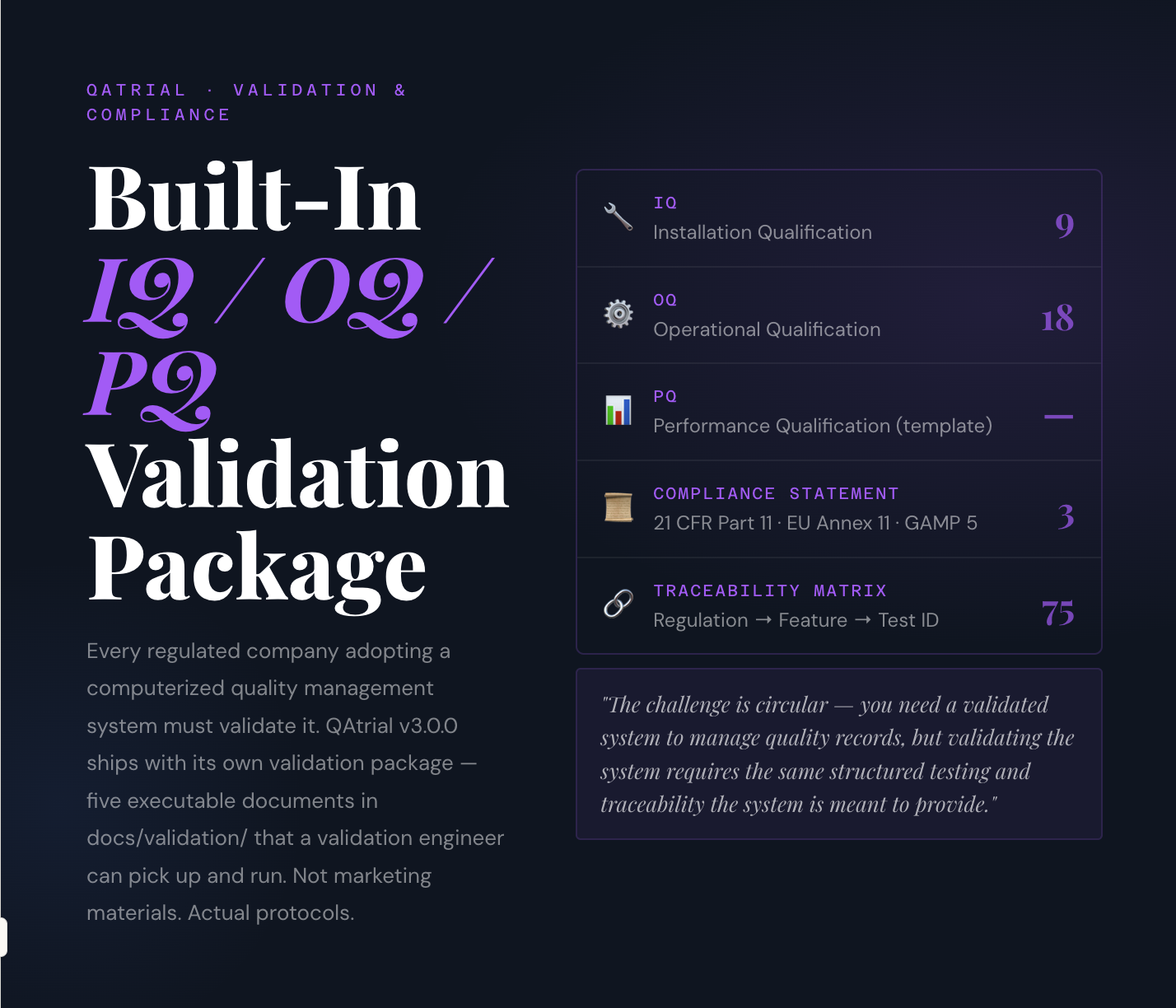
The practical challenge is circular. You need a validated system to manage quality records. But validating the system requires the same kind of structured testing, documented evidence, and traceability that the system is supposed to provide. Most organizations solve this by hiring consultants, spending weeks writing validation protocols from scratch, and then executing tests against documentation that may not reflect the actual software.
IQ / OQ / PQ
Validation Package
| Step | What Is Verified | Category |
|---|---|---|
| OQ-01 | Setup wizard completes and creates a project | Core Workflow |
| OQ-02 | Requirement creation with auto-generated sequential ID (REQ-NNN) | Core Workflow |
| OQ-03 | Requirement editing and status transitions | Core Workflow |
| OQ-04 | Test case creation with auto-generated ID (TST-NNN) | Core Workflow |
| OQ-05 | Test case editing and status transitions | Core Workflow |
| OQ-06 | Requirement-to-test linking (traceability) | Core Workflow |
| OQ-07 | AI test case generation from a requirement | AI Feature |
| OQ-08 | AI risk classification of requirements | AI Feature |
| OQ-09 | Approval workflow: request, approve, reject cycle | Core Workflow |
| OQ-10 | Electronic signature with password re-authentication | E-Signature |
| OQ-11 | Evidence file attachment to a requirement | Core Workflow |
| OQ-12 | CSV export of requirements | Core Workflow |
| OQ-13 | CSV import with column mapping and duplicate handling | Core Workflow |
| OQ-14 | Design control phase progression and gate states | Core Workflow |
| OQ-15 | ISO 13485 gap analysis execution (27 clauses) | AI Feature |
| OQ-16 | CAPA creation and 6-state lifecycle transitions | Core Workflow |
| OQ-17 | Audit mode link generation and read-only access verification | Audit Access |
| OQ-18 | RBAC enforcement: non-admin cannot access admin; QA Engineer cannot approve | Security |
08, 15
QAtrial feature →
IQ/OQ/PQ test ID
Auditors can trace any regulation forward to a specific test and its recorded result.
QAtrial v3.0.0 takes a different approach: it ships with its own validation package.
What Is in the Validation Package
The validation package consists of five documents in the docs/validation/ directory of the QAtrial repository. These are not marketing materials. They are executable validation protocols that a validation engineer can pick up and run.
Installation Qualification (IQ)
Purpose: Verify that QAtrial is correctly installed and all components are operational.
9 test steps:
| Step | What Is Verified |
|---|---|
| IQ-01 | Server starts and responds on the configured port |
| IQ-02 | PostgreSQL database is connected and accessible |
| IQ-03 | Frontend loads in a browser |
| IQ-04 | User registration creates a new account |
| IQ-05 | User login returns valid authentication tokens |
| IQ-06 | File storage (evidence uploads) is functional |
| IQ-07 | Theme switching (light/dark mode) works |
| IQ-08 | Language selection changes the interface language |
| IQ-09 | Status endpoint returns system health information |
Each step includes: test ID, description, prerequisite, procedure, expected result, and fields for actual result, pass/fail, tester initials, and date.
The IQ confirms that the infrastructure layer is working. It answers the fundamental question: “Is the software installed correctly in this environment?”
Operational Qualification (OQ)
Purpose: Verify that QAtrial’s core workflows function correctly under normal operating conditions.
18 test steps:
| Step | What Is Verified |
|---|---|
| OQ-01 | Setup wizard completes and creates a project |
| OQ-02 | Requirement creation with auto-generated ID |
| OQ-03 | Requirement editing and status changes |
| OQ-04 | Test case creation with auto-generated ID |
| OQ-05 | Test case editing and status changes |
| OQ-06 | Requirement-to-test linking (traceability) |
| OQ-07 | AI test case generation from a requirement |
| OQ-08 | AI risk classification |
| OQ-09 | Approval workflow (request, approve, reject) |
| OQ-10 | Electronic signature with password re-authentication |
| OQ-11 | Evidence file attachment to a requirement |
| OQ-12 | CSV export of requirements |
| OQ-13 | CSV import with column mapping |
| OQ-14 | Design control phase progression |
| OQ-15 | ISO 13485 gap analysis execution |
| OQ-16 | CAPA creation and lifecycle transitions |
| OQ-17 | Audit mode link generation and read-only access |
| OQ-18 | RBAC enforcement (role-based permission checks) |
The OQ is the workhorse of the validation. It exercises every major feature path and verifies that the system behaves as documented. Each test step is independent and can be executed in any order, though the listed sequence follows a logical workflow.
Performance Qualification (PQ)
Purpose: Verify that QAtrial performs acceptably in the customer’s specific production environment with their actual data volumes and usage patterns.
The PQ is a template, not a pre-filled protocol. This is intentional. Performance qualification must reflect the specific deployment: the customer’s hardware, network, user count, data volume, and concurrent usage patterns. QAtrial cannot pre-define these parameters.
The PQ template includes sections for:
- Environment description (hardware, OS, database version, network configuration)
- Customer-specific test cases (e.g., “Import 5,000 requirements from CSV in under 60 seconds”)
- Performance criteria and acceptance thresholds
- Load testing scenarios (concurrent users, simultaneous operations)
- Result recording and sign-off
Compliance Statement
Purpose: Document QAtrial’s alignment with applicable regulatory requirements.
The Compliance Statement maps QAtrial features against three regulatory frameworks:
21 CFR Part 11 — Electronic Records and Electronic Signatures (15 sections):
Every section from 11.10(a) through 11.200 is addressed. For each, the statement describes QAtrial’s specific implementation. Example: Section 11.10(e) (audit trail) maps to QAtrial’s append-only audit log capturing who, what, when, why for every change, with previous and new values recorded.
EU Annex 11 — Computerised Systems (17 sections):
Every section from risk management (section 1) through archiving (section 17) is addressed. Example: Section 9 (audit trail) maps to QAtrial’s chronological log capturing identity, action, timestamp, old/new values, and reason.
GAMP 5 Second Edition:
QAtrial is classified as Category 4 — Configured Product. The rationale: customers configure QAtrial for their specific country, vertical, and module needs without modifying source code. The validation approach follows GAMP 5 guidelines for risk-based validation of configured products.
Traceability Matrix
Purpose: Map regulatory requirements to QAtrial features and validation test IDs.
The matrix contains 75 regulatory requirements drawn from six standards:
- 21 CFR Part 11
- EU Annex 11
- GAMP 5
- ISO 13485
- 21 CFR Part 820 / QMSR
- ICH Q7/Q10
Each requirement row includes: the regulatory reference, the requirement text, the QAtrial feature that addresses it, and the specific IQ/OQ/PQ test ID that verifies the feature. This creates a three-way linkage: regulation to feature to test.
Auditors reviewing QAtrial’s validation can trace any regulatory requirement forward to a specific test and its result. This is the traceability that 21 CFR Part 11 section 11.10(a) demands and that auditors expect to see.
![Express Schedule Free Employee Scheduling Software [PC/Mac Download]](https://m.media-amazon.com/images/I/41yvuCFIVfS._SL500_.jpg)
Express Schedule Free Employee Scheduling Software [PC/Mac Download]
- User-friendly drag & drop scheduling: Simple shift planning interface
- Manage time-off and holidays: Add sick leave, breaks, holidays
- Email schedules to staff: Send schedules directly via email
As an affiliate, we earn on qualifying purchases.
As an affiliate, we earn on qualifying purchases.
How to Execute the IQ/OQ
Prerequisites
- QAtrial deployed and running (Docker recommended:
docker-compose up). - A validation engineer with access to the system.
- Printed or electronic copies of the IQ and OQ protocols from
docs/validation/. - A pen (for paper execution) or a controlled document system (for electronic execution).
IQ Execution (Estimated: 1-2 hours)
Execute each of the 9 IQ steps in sequence:
- Open the protocol to IQ-01.
- Read the procedure. Follow it exactly as written.
- Compare the actual result to the expected result.
- Record: actual result, pass/fail, tester initials, date.
- If a step fails, document the deviation and investigate. Do not proceed to OQ until all IQ steps pass or deviations are formally documented and assessed.
- Repeat for IQ-02 through IQ-09.
- Sign and date the IQ protocol. Have a second person review and co-sign.
OQ Execution (Estimated: 4-8 hours)
Execute each of the 18 OQ steps:
- Ensure IQ has been completed and approved.
- Open the protocol to OQ-01.
- Follow the procedure. Each step describes the specific actions to take and the expected system response.
- Record results for each step.
- For AI-dependent steps (OQ-07, OQ-08, OQ-15), ensure an AI provider is configured. If no AI provider is available, document this as a planned deviation and note that these features will be validated when AI is configured.
- Complete all 18 steps. Sign and date. Review and co-sign.
PQ Execution (Estimated: 1-3 days, depending on scope)
- Complete the PQ template with environment-specific information.
- Define customer-specific test cases based on actual usage patterns.
- Execute the tests in the production environment.
- Document results and obtain approval.
Documentation Package
After execution, the complete validation package consists of:
- Completed and signed IQ protocol
- Completed and signed OQ protocol
- Completed and signed PQ protocol
- Compliance Statement (reviewed and acknowledged)
- Traceability Matrix (reviewed for completeness)
- Any deviation reports with impact assessments
- Validation Summary Report (can be AI-generated using QAtrial’s VSR function)
This package is audit-ready. It can be stored within QAtrial itself (as evidence attachments) or in the organization’s document management system.
As an affiliate, we earn on qualifying purchases.
What Auditors Want to See
Based on common FDA and Notified Body audit observations, auditors evaluating a quality management system’s validation typically look for:
- Documented validation plan. QAtrial’s IQ/OQ/PQ protocols serve as the plan. The Traceability Matrix demonstrates that the plan covers applicable regulatory requirements.
- Executed test protocols with results. The IQ and OQ protocols include fields for actual results, pass/fail determination, and tester identification.
- Traceability from regulations to tests. The 75-requirement Traceability Matrix provides this linkage explicitly.
- Deviation handling. Any test that does not pass as expected requires a documented deviation with impact assessment. The protocols include space for deviation references.
- Periodic review. The PQ template includes a section for defining the re-validation schedule. QAtrial’s version-controlled releases provide clear triggers for re-validation.
- Evidence of change control. QAtrial’s source code is in a Git repository. Every change is traceable to a commit. The Compliance Statement notes this as part of GAMP 5’s configuration management requirements.

Kaisi Professional Electronics Opening Pry Tool Repair Kit Metal Spudger
- Complete Repair Kit: 20 pcs for various devices
- Durable Material: Made from professional-grade stainless steel
- Versatile Tools: Includes plastic, steel pry tools and ESD tweezers
As an affiliate, we earn on qualifying purchases.
As an affiliate, we earn on qualifying purchases.
The Open-Source Advantage
There is one thing QAtrial’s validation package provides that no proprietary vendor can match: source code access.
When an auditor asks “How does the audit trail work?”, the answer is not a vendor’s marketing document or a high-level architecture diagram. The answer is server/services/audit.service.ts — the actual code that implements the append-only audit log. The auditor can inspect the implementation, verify that records cannot be deleted, confirm that timestamps are server-generated, and validate that user identity is captured from the JWT token.
This level of transparency is unique to open-source software. Under AGPL-3.0, the source code is not just available — it is guaranteed to remain available. No vendor can revoke access. No license change can hide the implementation.
For validation engineers accustomed to treating vendor software as a black box, this transparency fundamentally changes the assurance model. The system can be validated not just by testing its behavior but by inspecting its implementation.
validation documentation templates for regulated industries
As an affiliate, we earn on qualifying purchases.
As an affiliate, we earn on qualifying purchases.
Conclusion
QAtrial’s built-in validation package eliminates the most time-consuming aspect of adopting a new quality management system in a regulated environment. The IQ, OQ, and PQ protocols are ready to execute. The Compliance Statement documents regulatory alignment. The Traceability Matrix links 75 requirements to features and tests. The complete validation — from first test to signed protocol — can be accomplished in days, not months.
QAtrial v3.0.0 and its validation package are available under the AGPL-3.0 license at https://github.com/MeyerThorsten/QAtrial.