TL;DR
BetterWispr has introduced a free, Apache 2.0-licensed dictation app for macOS 14 and later. Its developer says speech can be transcribed on the Mac using built-in models, with no account or cloud transcription fallback; model choice, language coverage and performance vary.
BetterWispr has introduced a free, open-source dictation app for Macs running macOS 14 or later, offering speech transcription and text cleanup without requiring an account. The developer says speech can stay on the Mac when users select a local model, positioning the app as an option for people who want to dictate into other applications without sending recordings to a transcription service.

Get business pricing on monitors, keyboards and dev gear
- Business-only prices and quantity discounts
- Tax-exempt purchasing
- Multiple users, one account, clear invoices
The app’s stated workflow is to place a cursor in a text field, hold Option + Space while speaking, then release the shortcut. BetterWispr transcribes after recording stops and inserts the result into the active application when possible. The developer says users can change the shortcut, switch from hold-to-talk to toggle recording, and retrieve text from the dashboard if an app blocks automatic insertion.
BetterWispr lists nine built-in models from Apple Speech, Parakeet and Whisper. Language coverage depends on the model: the site says Parakeet TDT v3 supports 25 European languages, a separate Parakeet model supports Japanese, and Whisper has broader multilingual recognition. Users can also connect to Sarvam AI, Smallest AI or an OpenAI-compatible API, but those options involve an external provider rather than the local-only setup described for built-in models.
Text handling is adjustable. The default Light cleanup removes English fillers, repetitions and false starts; None retains the spoken wording, while Medium also edits for clarity using a selected notes model. The app offers app-specific writing styles, spoken punctuation commands and a history of original and corrected text. Its meeting-notes feature separates the user’s microphone audio from audio from other apps, then uses Apple Intelligence or Ollama for summaries, decisions and action items, according to the developer.
Local Dictation With User Controls
BetterWispr brings together on-device transcription, adjustable editing and text insertion across apps in a single Mac utility. For users handling private notes or working without reliable internet, local models may reduce the need to send speech to a transcription server. The developer says compatible models can work offline after installation and that there is no cloud transcription fallback for the built-in local workflow.
The privacy description has limits readers should understand: users may choose third-party APIs, and the site says dictations are stored in local history unless that feature is turned off. BetterWispr also needs microphone access to record speech and Accessibility permission to insert text into other apps; Apple Speech requires Speech Recognition permission. Local processing is a design choice, not a guarantee that every optional feature or configuration keeps data on-device.
The project is released under the Apache 2.0 license, and the developer says its source can be inspected or built by users. That offers a way to review how the tool works, though the source material does not include an independent security or privacy audit.
Products Worth Considering

BowFlex Results Series 552 SelectTech Adjustable Dumbbell

BowFlex Results Series SelectTech Adjustable Dumbbells (Pair)
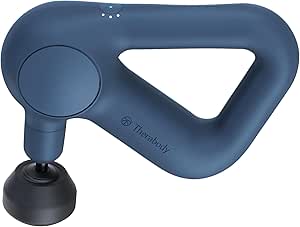
Therabody Theragun Relief Massage Gun, 3-Speed, Navy
As an affiliate, we earn on qualifying purchases.
How BetterWispr Works
The launch page presents BetterWispr as a dictation tool for everyday Mac applications rather than a standalone transcription editor. It relies on a keyboard shortcut to capture speech and then places the finished text where the cursor is, subject to the target app’s permissions and paste behavior. The site explicitly says transcription does not appear word by word while the user is speaking.
Setup requires downloading a compatible speech model and granting relevant macOS permissions. macOS 14 or later is required, and Apple Silicon is recommended for local model inference. The developer says models download when users choose to install them and that the app receives updates from GitHub Releases through Sparkle, checking an EdDSA signature before installation.
The product page includes a typing-versus-speaking illustration, but labels it as an illustration rather than a benchmark. Its displayed timing and speed figures should not be read as a measured performance result for BetterWispr.
“Speech stays on your Mac.”
— BetterWispr website
Model Support And Performance
The launch material does not provide independent testing of transcription accuracy, latency, resource use or privacy protections. It also does not give comparative performance figures across the nine built-in models or supported Mac configurations. The site’s typing-speed illustration is explicitly not a benchmark.
Language availability and results depend on the selected model, hardware, locale and installed assets. The developer says styles, filler cleanup and voice commands work in English, while speech-recognition coverage varies. It is not clear from the provided material how well the app performs with accents, noisy recordings or specialized vocabulary beyond its user-added hints and replacements.
Some details about the launch itself are absent: the supplied source gives no release date, download count, independent user testing or third-party review. The source also does not document an external audit of the code or explain retention behavior for every optional API provider. Users selecting those services should check the provider’s own data terms.
Install, Test And Review
Readers can install BetterWispr from the developer’s site, grant the required macOS permissions and download a speech model. The next practical step is to test the chosen model with the user’s own language, voice and vocabulary, then check whether text insertion works in the applications they use. The developer says users can report issues on GitHub or build the app from its source.
Further information about adoption, model accuracy and updates may emerge through the project’s release notes and issue reports. The supplied launch material does not announce a specific next release, planned milestone or independent evaluation, so those developments remain unconfirmed.
Key Questions
Is BetterWispr free?
Yes, according to the developer. BetterWispr is described as free and open source under the Apache 2.0 license, with no subscription or account requirement for the local dictation workflow. Model files use storage on the Mac.
Does BetterWispr send recordings to the cloud?
The developer says built-in local models transcribe speech on the Mac and that there is no cloud transcription fallback. Users can separately choose an external API provider, in which case processing may involve that provider. Meeting-note and cleanup features also depend on the model selected.
Which Macs and languages does it support?
The app requires macOS 14 or later, with Apple Silicon recommended. Language support varies by speech model: the developer lists Parakeet coverage for 25 European languages and Japanese, while Whisper offers broader multilingual recognition. Apple Speech depends on the user’s locale and installed assets.
Does dictation appear as the user speaks?
No. The launch page says BetterWispr starts transcription after the recording ends. The standard workflow is to hold Option + Space while speaking and release the shortcut to process the recording.
Can users keep every spoken word?
Yes. The developer says users can set cleanup to None to retain every word. Light cleanup removes English fillers, repetitions and false starts by default; Medium also edits for clarity with a selected notes model.
Source: hn